What Are Cornerstone Posts? Cornerstone posts are the foundation of your website’s content strategy — your evergreen guides, key landing pages, or flagship blog posts. These pages explain core concepts, drive traffic, or convert readers into subscribers, customers, or loyal fans. Most cornerstone content is well over 2,000 words long, though some can be over...
The WebberZone Followed Posts settings page is at Settings > Followed Posts. Settings are organized across five tabs: General, Output, Thumbnail, Styles, and Feed. General tab Enable cache When enabled, the HTML output for each post is saved in post meta on first load and reused on subsequent page loads. Disable temporarily when testing output...
The Popular Post list options section contains a set of options that allow you to fine tune the settings of the list of popular articles from you blog. These are global settings and many of these can be overridden in the widget or the shortcode. Use global settings in block (Pro only) If activated, the...
The Thumbnail options section in Contextual Related Posts contains a set of options that allow you to fine-tune the thumbnails displayed in the related posts. These are global settings, and many of these can be overridden in the widget or the shortcode. Location of the post thumbnail Choose where the thumbnail is displayed in relation...
The Output tab in Contextual Related Posts allows you to configure the display of the related posts. Output settings Heading of posts Displayed before the list of posts as a master heading. Show when no posts are found Choose what to display when no related posts are found. Options are: Custom text Enter the custom...
Contextual Related Posts adds a metabox to the bottom of Edit screens. These allow you to set post specific configurations for the plugin. By default, it applies to all public post types, but Contextual Related Posts Pro users can restrict it to specific post types via Show metabox on these post types in the General...
The Thumbnail options section contains options that let you fine-tune the thumbnails displayed in the popular posts. These are global settings, and many of these can be overridden in the widget or the shortcode. Location of the post thumbnail You have four options for the thumbnail’s placement: before or after the title, only thumbnails, or...
The Styles section contains a set of options that allow you to choose between various styles to customize the appearance of the popular posts list. These are global settings and many of these can be overridden in the widget or the shortcode. Popular posts style Choose between the following styles in which the popular posts...
The Output tab of the Better Search settings page lets you fine-tune how search results are displayed and styled. Display options These settings customize the output of the search results page. Except for the highlight setting, these only apply when Seamless mode is off. Highlight search terms If enabled, search terms are wrapped with the...
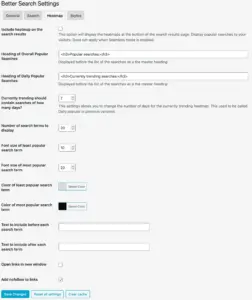
The Heatmap tab of the Better Search settings page lets you fine-tune how popular search terms are generated and displayed. Below is an explanation of each available setting. Include heatmap on the search results This option displays heatmaps at the bottom of the search results page, showing popular searches to visitors. It is not applicable...
The Server Load Threshold setting was introduced in Contextual Related Posts Pro v4.2.0 and exists for one simple reason: your database should stay responsive, even when traffic spikes. This setting lets you define how busy is too busy. You can find this setting under the Performance tab in the Related Posts settings page. What this...
The Styles section in Contextual Related Posts contains a set of options that allow you to choose between various styles to customize the appearance of the related posts list. These are global settings, and many of these can be overridden in the widget or the shortcode. Related posts style This allows you to select one...