

The Tools screen in Top 10 offers a set of buttons to help you maintain various features of the plugin.
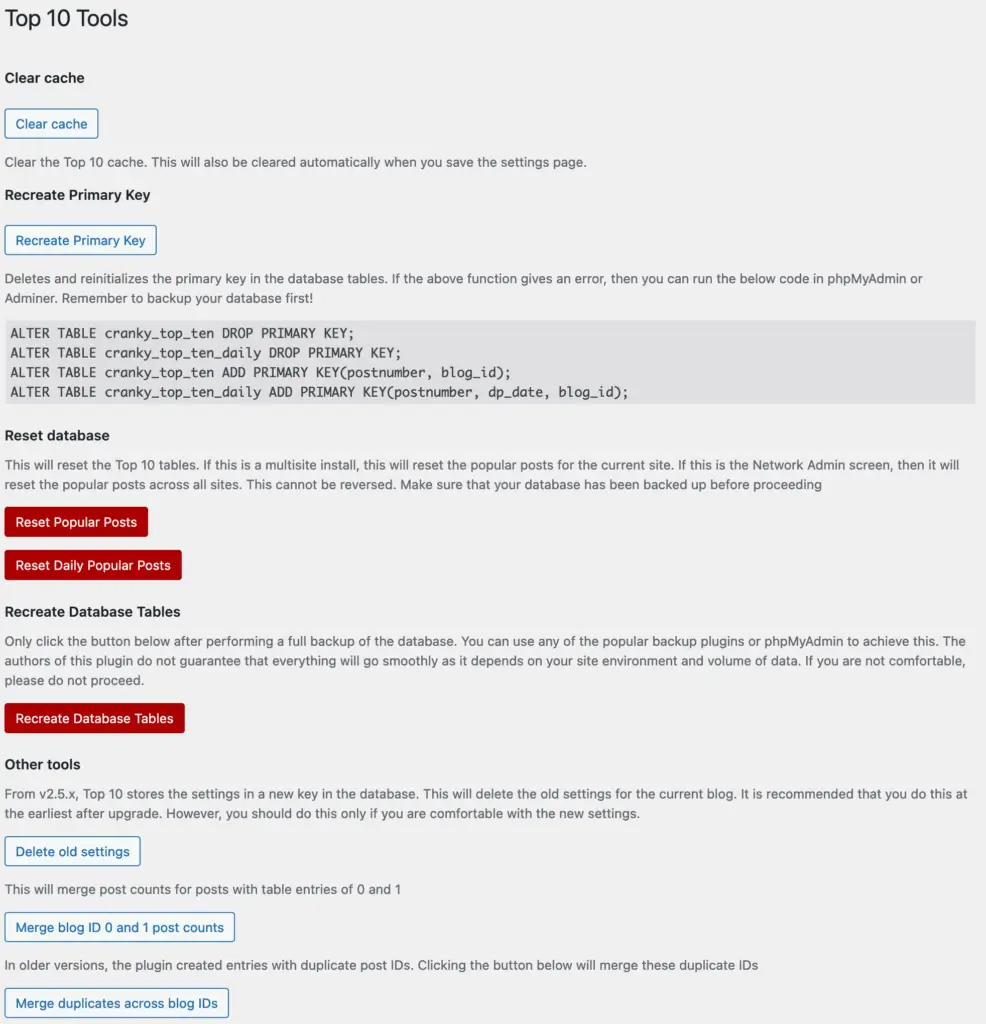
Database Status
Displays the current state of all four Top 10 database tables along with the installed and expected database version numbers.
| Table | Purpose |
|---|---|
wp_top_ten | Running total of all-time views per post |
wp_top_ten_daily | Hourly view counts per post (powers the dashboard chart and daily popular posts lists) |
wp_top_ten_visits_funnel | Hot buffer — incoming visits waiting to be aggregated into the count tables |
wp_top_ten_visits_log | Cold archive — every individual visit, retained for the configured number of days |
Each table row shows whether the table is installed, its estimated number of entries, and its estimated size. If a required table is missing a Recreate tables link appears to repair it. On a multisite network, these figures are network-wide totals across all sites and are labeled accordingly.
Clear Cache
Clears the Top 10 cache. This is also done automatically when you save the settings page. You can find a similar button at the bottom of the settings page if you are using Top 10 Pro.
Sync Funnel Now
Drains the visits funnel table into the count tables immediately, without waiting for the next scheduled cron run.
Top 10 uses a two-stage tracking pipeline: every page view is written as a single row into the wp_top_ten_visits_funnel table, and a background cron job aggregates those rows into wp_top_ten and wp_top_ten_daily every two minutes. This keeps the per-request database write as fast as possible.
Use Sync Funnel Now when you need counts to reflect immediately — for example after importing data, during testing, or if you suspect the aggregation cron is not running. It is equivalent to running the aggregation cron job on demand. If the funnel is empty, a lock from a concurrent run is detected, or a database error occurs, a distinct error message is shown rather than a silent no-op.
See Trackers in Top 10 for a full explanation of the tracking pipeline and database tables.
Enable Feed View Counts
Top 10 stores the feed share of each view count in a feedcnt column on wp_top_ten and wp_top_ten_daily. The upgrade adds this column instantly where the database server supports it (MySQL 8.0.12+ or MariaDB 10.3+). Small tables and SQLite databases can be updated directly. If a larger table cannot be updated instantly, the column is left pending, an admin notice appears on Top 10 screens, and this box shows an Add Feed Views Column button.
Adding the column rebuilds the count tables, which can take several minutes on large sites, so run it during a quiet period. Historical feed views are then imported from the visits log in the background. See Feed vs web statistics for the report and backfill limits. On a multisite network, the button is on the Network Admin Tools screen. The same operation is available from the command line via wp top10 db add-feed-columns.
Recreate Primary Key
Deletes and reinitializes the primary key in the database tables. If you encounter an error, you can run the provided SQL code in phpMyAdmin or Adminer. Remember to back up your database first!
Reset Database
Resets the Top 10 tables. For multisite installs, it resets the popular posts for the current site. On the Network Admin screen, it resets the popular posts across all sites. This action cannot be reversed, so ensure your database is backed up before proceeding.
Reduce Daily Table Size (Pro only)
Combines hourly records in the daily table that are older than a chosen number of days (default 14) into a single daily record per post. This reduces the size of wp_top_ten_daily without changing overall view counts or recent hourly data. On the Network Admin Tools screen, the button reads Reduce Daily Table Size Across Network and runs for every active site.
This is a one-way reduction of older hourly detail — back up your database first if you need to retain it. The same operation is available from the command line via wp top10 db rollup.
Recreate Database Tables
Recreates all four Top 10 database tables (wp_top_ten, wp_top_ten_daily, wp_top_ten_visits_funnel, and wp_top_ten_visits_log). Each table’s data is preserved by copying it to a temporary table before the drop and restoring it afterwards.
Perform a full backup of the database before proceeding. Use any popular backup plugins or phpMyAdmin for this task. This could cause an issue if you have a huge set of tables with the tracked post data.
Other Tools
Delete Old Settings
Deletes old settings for the current blog. Recommended after upgrading to v2.5.x or later. Only proceed if you are comfortable with the new settings.
Merge Post Counts
Merges post counts for posts with duplicate entries. This will merge duplicate post IDs created in older versions of the plugin.

 WebberZone Link Warnings Settings Reference
 Efficient Content Storage and Indexing (ECSI) in Contextual Related Posts Pro and Better Search Pro
 Better Search Settings – Search