This document covers all settings in WebberZone Snippetz. Access settings via Snippetz → Settings when the Snippets Manager is enabled, or via Settings → Snippetz when it is disabled. The settings screen, refreshed in v2.4.1, lays its tabs out vertically down the left side with a search box above them that filters options across all...
WebberZone Link Warnings settings are available at Settings → Link Warnings. The tabs are General, Display, Rules, and Advanced. Settings are stored in a single WordPress option: wzlw_settings. General tab Warning Method Controls how users are warned about external links. Value Label Behavior inline Inline indicators only Adds configured visual indicators and hidden text for...
The Tools screen in Top 10 offers a set of buttons to help you maintain various features of the plugin. Database Status Displays the current state of all four Top 10 database tables along with the installed and expected database version numbers. Table Purpose wp_top_ten Running total of all-time views per post wp_top_ten_daily Hourly view...
The Popular post list options section in Top 10 controls which posts appear and how the list is displayed. The Popular Post list options section contains a set of options that allow you to fine tune the settings of the list of popular articles from you blog. These are global settings and many of these...
The Features tab is the first tab on the Top 10 settings page. It lets you turn off individual features so their code does not load on your site. All features are enabled by default. A block that you disable renders as empty on the front end and shows an unavailable notice in the block...
Popular Authors ranks your site’s authors by the total views of their posts, using the counts tracked by Top 10 Pro. It replaces the retired standalone Popular Authors plugin. The settings below set the global defaults. Open Top 10 → Settings and click the Popular Authors tab. The tab appears only when Popular Authors is...
The Knowledge Base plugin lets you back up all plugin settings as a JSON file and restore them on the same site or a different one. Both actions are available under Knowledge Base → Tools. Exporting settings Click Export Settings to download a .json file named {site}-settings-{date}.json. The file contains every setting stored under the...
The Performance tab in Better Search includes options designed to optimize how the search results are queried and displayed, especially for high-traffic or large sites. This section provides options for using custom database tables, caching, and fine-tuning query performance. Efficient Content Storage and Indexing (ECSI) Efficient Content Storage and Indexing (ECSI) is a Better Search...
The Output tab of the Better Search settings page lets you fine-tune how search results are displayed and styled. Display options These settings customize the output of the search results page. Except for the highlight setting, these only apply when Seamless mode is off. Highlight search terms If enabled, search terms are wrapped with the...
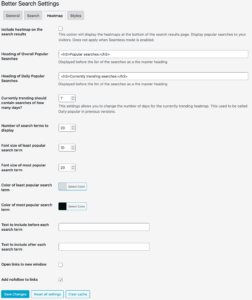
The Heatmap tab of the Better Search settings page lets you fine-tune how popular search terms are generated and displayed. Below is an explanation of each available setting. Include heatmap on the search results This option displays heatmaps at the bottom of the search results page, showing popular searches to visitors. It is not applicable...
The Feature Manager, introduced in Better Search 4.4.0, lets you turn off optional features you are not using. When a feature is turned off, its code does not load. Its settings remain visible but are marked as having no effect and are not saved. Live search, REST API search integration and “Did you mean” suggestions...
This document describes all available settings for the AutoClose plugin. Access settings via Settings → AutoClose in your WordPress admin. Since v3.1.2, a search box on the settings screen filters options across all tabs as you type: start typing to jump straight to the setting you are looking for. General Activate scheduled closing Enable to...