
Knowledge Base includes a live search feature that shows article suggestions in a dropdown as visitors type in the search form: no page reload needed. Results update in real time, support keyboard navigation, and include screen reader announcements for accessibility. Enabling live search Go to Knowledge Base → Settings → Output → Search and make...
Better Search can highlight the terms a visitor searched for, both on the search results page and on the post or page they click through to. This makes it easy for visitors to spot why a result matched their query. How it works Highlighting has two settings on the Output tab of the Better Search...
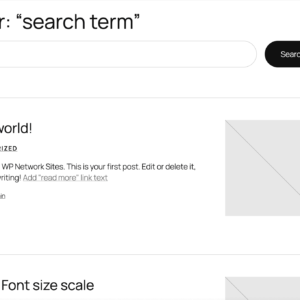
Better Search works out of the box. Install and activate it and you’re ready to go. By default, Better Search integrates with your theme by overriding the main query to display relevant search results. If you turn Seamless Mode off, then Better Search will look for a file called better-search-template.php in your current themes folder....
Search redirects, introduced in Better Search Pro 4.4.0, send visitors straight to a specific post, page or URL when they search for a matching keyword, before the search results page loads. Redirected searches are still recorded in your search statistics. Enabling search redirects Adding a redirect rule Click Add redirect and fill in these fields:...
What is Fuzzy Search? Fuzzy search helps users find results even if their query contains typos, misspellings, or partial matches. By loosening the search criteria, fuzzy search improves accuracy and user satisfaction, especially for sites with a diverse audience or complex search terms. Why Use Fuzzy Search? This is ideal for e-commerce sites, educational resources,...
What is Live Search? Live search, often called Ajax search, dynamically updates search results as users type into the search bar. This provides instant feedback, allowing users to find what they’re looking for without needing to submit the form or reload the page. Why Enable Live Search? Enabling live search improves the user experience by:...
What is “Did You Mean”? When a visitor’s search returns zero results (often because of a typo or misspelling), “Did You Mean” suggests a corrected search term instead of leaving them with an empty results page. Depending on the mode you choose, Better Search Pro either shows a clickable suggestion link or transparently re-runs the...
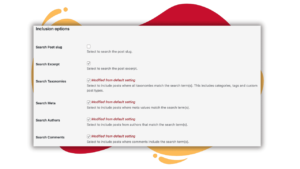
Better Search uses MySQL Full-Text search to rank results by relevance. Here is how Better Search processes search queries, ranks posts, and calculates relevance. Overview of the Search Algorithm Recency weighting (Pro only) When Recency boost (%) is above 0 and results are ordered by relevance or relatedness, Better Search multiplies each raw relevance score...

The Search tab of the Better Search settings page offers a collection of options that allow you to fine-tune how search results are generated, displayed, and filtered. Below is an explanation of each available setting. Search Configuration Number of Search Results per page Set the maximum number of search results displayed per page. Post types...

The Performance tab in Better Search includes options designed to optimize how the search results are queried and displayed, especially for high-traffic or large sites. This section provides options for using custom database tables, caching, and fine-tuning query performance. Efficient Content Storage and Indexing (ECSI) Efficient Content Storage and Indexing (ECSI) is a Better Search...

The Output tab of the Better Search settings page lets you fine-tune how search results are displayed and styled. Display options These settings customize the output of the search results page. Except for the highlight setting, these only apply when Seamless mode is off. Highlight search terms If enabled, search terms are wrapped with the...
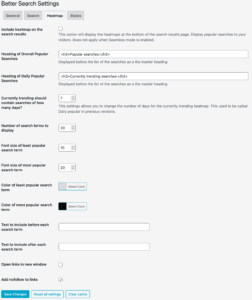
The Heatmap tab of the Better Search settings page lets you fine-tune how popular search terms are generated and displayed. Below is an explanation of each available setting. Include heatmap on the search results This option displays heatmaps at the bottom of the search results page, showing popular searches to visitors. It is not applicable...

