WebberZone Image Optimizer adds a status column and per-image actions to the Media Library list view (Media → Library, list mode) for every image it can optimize. The Optimized column The Details link opens a table with one row per image size: its dimensions, the original file size, and the size and saving of each...
WebberZone Image Optimizer settings live at Media → Image Optimizer, across four tabs: General, Quality, Delivery and Advanced. General Formats to generate Choose WebP, AVIF or both. AVIF files are smaller than WebP but take longer to encode and are understood by slightly fewer browsers. Generating both lets each visitor receive the smallest file their...
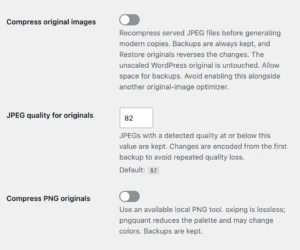
WebberZone Image Optimizer can optionally compress the served JPEG and PNG files as well as generate modern-format copies. This reduces the files used by social previews, direct links and other requests that do not use the plugin’s <picture> delivery. Enable original compression In Media → Image Optimizer → General, enable Compress original images and choose...
The Bulk Optimize screen in WebberZone Image Optimizer converts your existing media library. Find it at Media → Bulk Optimize. How it works The screen works through a database-backed queue one batch at a time rather than in a single long request, so a large library cannot trip the PHP time limit. Building the queue...
WebberZone Image Optimizer registers WP-CLI commands under wp wzio, useful for converting a library from a script, cron job, or deployment step without opening the admin screens. wp wzio status Shows which drivers and formats this server can encode, the currently configured formats, and how much of the library is converted. It also reports original...
WebberZone Image Optimizer converts images through a database-backed queue rather than during a page render. This is what makes the Bulk Optimize screen resumable and keeps front-end visitors from ever waiting on an encode. One row per attachment The queue holds one row per attachment. The converter processes its served main file and selected sub-sizes....
WebberZone Image Optimizer is one of several free WordPress plugins that convert images to WebP and AVIF locally, without uploading anything to a third-party service. The comparison here covers three plugins that take the same no-account, on-server approach: Modern Image Formats (the WordPress Performance Team’s webp-uploads), WebP Express, and Converter for Media (webp-converter-for-media). Cloud-based optimizers...
WebberZone Image Optimizer converts the images already in your media library to WebP and AVIF, and serves each visitor the smallest file their browser can read. Images are typically 40–60% smaller with no visible difference, and everything happens on your own server — there is no external service, no API key, no account and no...
The AVIF encoder effort setting is a 0–6 dial that belongs to the plugin, not to any encoder. Each driver translates it into its own backend’s native speed scale. The measurements behind that translation are recorded below, so the numbers do not have to be re-derived. The mapping Both built-in drivers use the same table...
The full developer reference for WebberZone Image Optimizer lives at webberzone.dev, a site generated directly from the plugin source. It documents every action and filter hook, every function, and every class and public method in the plugin, with parameters, return types and @since versions — and it is always regenerated from the current release, so...
WebberZone Image Optimizer is multisite-aware: settings, the conversion queue and per-image conversion records are all per site, exactly as if each site had its own separate installation. Per-site queues The plugin’s queue table is created per site rather than shared across the network. Each site works through its own queue independently, so a bulk run...
If your site already runs ShortPixel, Imagify, EWWW Image Optimizer or a similar plugin, the WebP and AVIF files it generated are ordinary files sitting next to your originals. WebberZone Image Optimizer can serve those existing files as they are. There is no import step, nothing is renamed, and nothing is converted a second time....