
The Popular Searches [Better Search] widget from Better Search displays a heatmap of searches made on your site. More popular terms appear larger and use the “hot” color, while less popular terms appear smaller and use the “cold” color. Each term links to the search results page for that query. Add the widget For example,...

Better Search uses MySQL Full-Text search to rank results by relevance. Here is how Better Search processes search queries, ranks posts, and calculates relevance. Overview of the Search Algorithm Recency weighting (Pro only) When Recency boost (%) is above 0 and results are ordered by relevance or relatedness, Better Search multiplies each raw relevance score...

The Search tab of the Better Search settings page offers a collection of options that allow you to fine-tune how search results are generated, displayed, and filtered. Below is an explanation of each available setting. Search Configuration Number of Search Results per page Set the maximum number of search results displayed per page. Post types...

The Performance tab in Better Search includes options designed to optimize how the search results are queried and displayed, especially for high-traffic or large sites. This section provides options for using custom database tables, caching, and fine-tuning query performance. Efficient Content Storage and Indexing (ECSI) Efficient Content Storage and Indexing (ECSI) is a Better Search...
The Output tab of the Better Search settings page lets you fine-tune how search results are displayed and styled. Display options These settings customize the output of the search results page. Except for the highlight setting, these only apply when Seamless mode is off. Highlight search terms If enabled, search terms are wrapped with the...
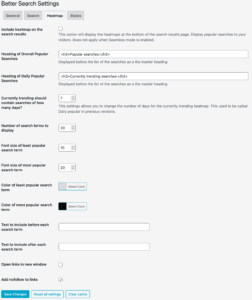
The Heatmap tab of the Better Search settings page lets you fine-tune how popular search terms are generated and displayed. Below is an explanation of each available setting. Include heatmap on the search results This option displays heatmaps at the bottom of the search results page, showing popular searches to visitors. It is not applicable...

The General section is the first in the Better Search settings screen. It gives you the main options for configuring Better Search on your WordPress blog. Enable Seamless Integration This setting integrates Better Search completely with your theme. When enabled, the plugin ignores the better-search-template.php file. Search results will still be sorted by relevance without...
The Feature Manager, introduced in Better Search 4.4.0, lets you turn off optional features you are not using. When a feature is turned off, its code does not load. Its settings remain visible but are marked as having no effect and are not saved. Live search, REST API search integration and “Did you mean” suggestions...
Better Search Pro 4.5.0 can answer a visitor’s question from your published posts. It finds relevant posts with Better Search, sends short excerpts to your AI provider, and shows a brief answer with source links. When your content has no answer, visitors get a link to the search results. AI answers are in beta and...
Better Search provides two shortcodes: page/2 better kadence install license test search wordpress price css elementor 1 get_crp_posts_id short code pro shortcode how to better search Shortcodes filter and Search for: Ask AI . These are available in both the free and pro versions of the plugin and can display a heatmap of popular searches...
Better Search is free to use and replaces WordPress search with relevance-ranked FULLTEXT results right out of the box. The Pro upgrade adds fuzzy matching, a custom search index, and WP-CLI integration for those who need more control. Cross-site search requires Pro Multi or Agency. Free vs Pro Feature Free Pro Core Search FULLTEXT relevance-ranked...
The Better Search Tools page provides database diagnostics, cache controls, and maintenance utilities. Open Better Search → Tools to view it. Status The Status section reports the installed and current database versions, whether the popular-search tables exist, their estimated row counts and sizes, and whether the required FULLTEXT indexes are installed. It does not change...

