

Why WordPress Popular Posts Plugins Use Different View Counting Methods (and Which to Choose)
WordPress doesn’t count page views. Every popular posts plugin has to add that itself, and the method it picks decides whether its numbers survive page caching, bots and heavy traffic.
I build Top 10, and its last few releases closed several counting gaps. Here’s where each approach breaks and how Top 10 4.7 handles it.
Server-side counting breaks under page caching
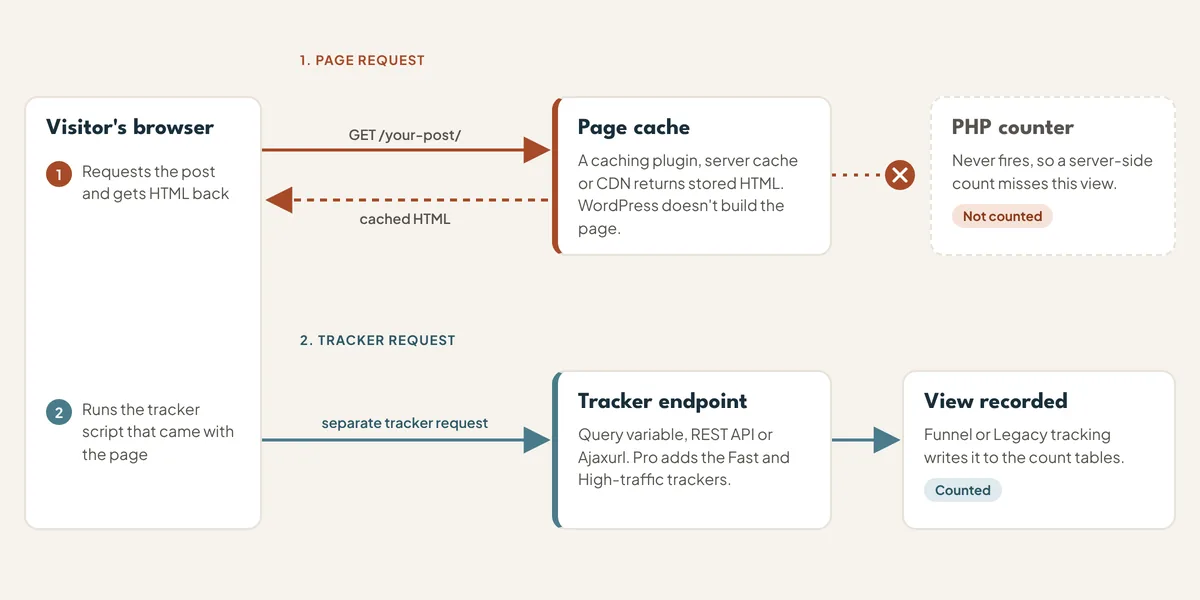
Counting in PHP while WordPress builds the page works until you add a page cache. A cached page is served without running PHP, so the counter never fires.
Browser-triggered counting
Top 10 and WP Popular Posts both count from the browser instead. A small script on the page sends its own request to record the view, so the HTML can come from any cache.
WP Popular PostsOpens in a new window 7.4.4 sends the view to its REST endpoint wordpress-popular-posts/v2/views/{id}. Its optional Data Sampling, off by default, records roughly one visit in every N as N views. That trades exact counts for fewer writes.
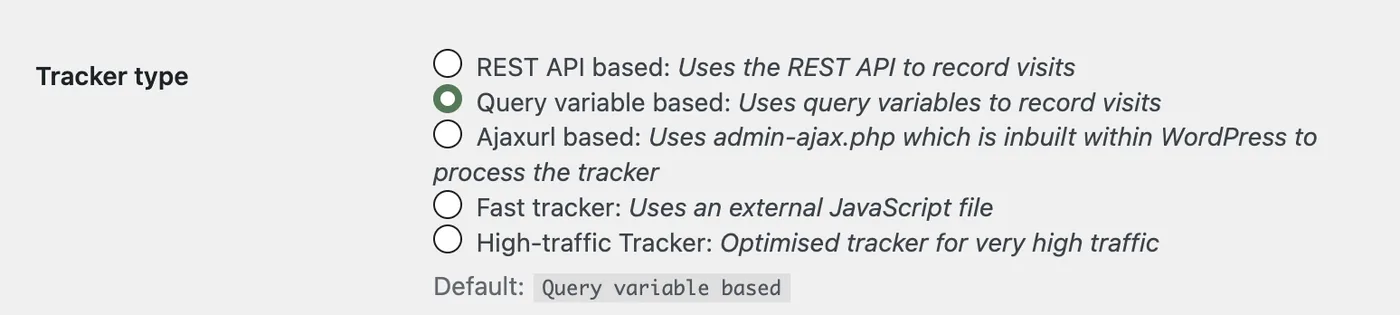
Top 10 has no sampling. It counts every view, and the free plugin offers three tracker types under Top 10 → Settings → Counter/Tracker:
- Query variable based (the default) sends the view to your home URL.
- REST API based uses the
top-10/v1/trackerendpoint, so the REST API must be reachable. - Ajaxurl based goes through
admin-ajax.php.
All three load WordPress to handle the request. Trackers in Top 10 explains when to switch.
Where the write lands: Funnel or Legacy
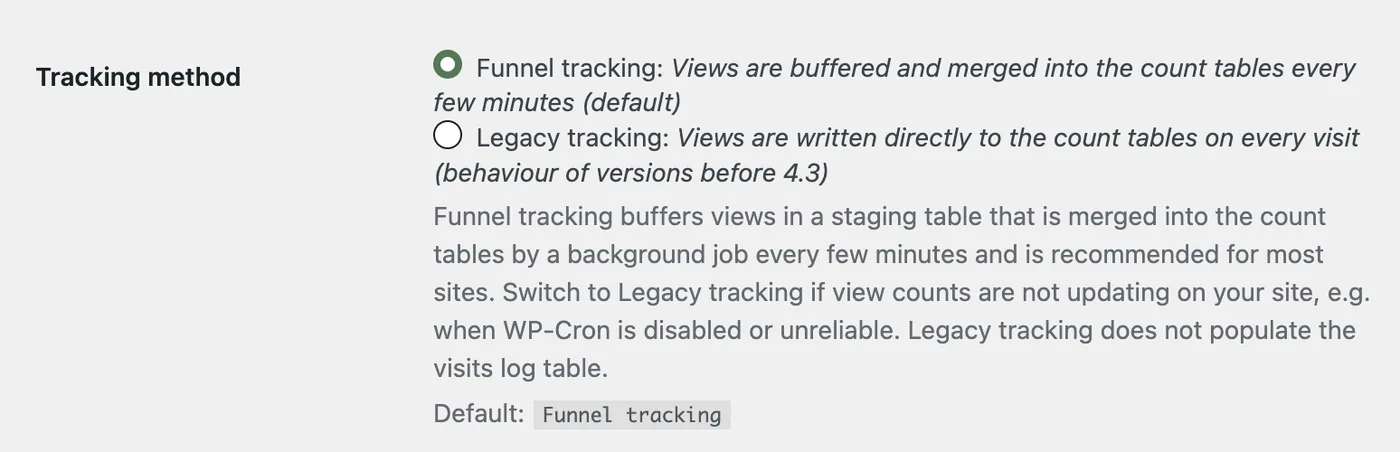
Funnel tracking, the default Tracking method, appends each view to a buffer table, wp_top_ten_visits_funnel. A background job merges it into the count tables every two minutes by default. Counts lag slightly; each visit costs one small insert.
Legacy tracking writes straight to the count tables on every visit. Switch to it if counts stop updating because WP-Cron is disabled or unreliable. The counter and tracker settings article lists every option and its default.
Pro trackers for heavy traffic
The Pro Fast tracker uses fast-tracker-js.php, which loads WordPress with SHORTINIT: core only, no theme, no plugins.
The Pro High-traffic Tracker skips WordPress entirely and writes to MySQL. It reads a generated top-10-fast-config.php, saved outside your web root, which also stores your Tracking method and Do not track bots choices.
Regenerate it after changing either one, your database credentials or the table prefix. Top 10 warns you when it’s out of date.
Bots, prefetches and the back button
Browser counting already skips bots that don’t run JavaScript. Some do.
Do not track bots is off by default. When enabled, Top 10 checks the user agent against the CrawlerDetect library and a bundled list, which you can extend with the tptn_bots filter.
Back-button visits went uncounted. Version 4.5 records the view again when a page returns from the back-forward cache.
Prefetches counted as views. 4.5 rejects requests the browser marks as prefetch or prerender.
Bots slipped through on cached pages. 4.5 runs the bot check on the tracking request, not the cached page. With Do not track bots on, 4.6.0 also stopped dropping views on cached pages a bot had generated.
Views or unique visitors
A view count can’t tell ten readers from one reader refreshing ten times. Top 10 Pro 4.7 adds Count unique visitors on the same settings tab, off by default.
It counts each visitor once per post per day without cookies. Top 10 hashes the IP address and user agent with a salt that changes daily and stores only the hash, so a visitor can’t be linked across days or posts.
It works with every tracker and both tracking methods. Counting starts when you enable it, so earlier periods show as partial or unavailable. Unique visitors in Top 10 Pro covers sorting lists, blocks and widgets by visitors.

Letting Koko Analytics count instead
If you already run Koko Analytics, Top 10 can use its page views. The free Data source setting has three modes: Top 10 (default); Hybrid, where Koko powers the lists while Top 10 keeps counting; and Koko Analytics only, which switches off every Top 10 tracker.
Which to choose
- Most sites with a page cache: the default Query variable tracker with Funnel tracking.
- Counts stuck because WP-Cron is unreliable: Legacy tracking.
- Sustained high traffic: the Pro Fast tracker, or the High-traffic Tracker if you’ll maintain its config file.
- Reach matters more than reloads: Pro unique visitors.
- Already running Koko Analytics: start with Hybrid.
Install Top 10 from WordPress.org. Top 10 Pro adds the Fast and High-traffic trackers and unique visitors; see the free vs Pro comparison for the rest. Pro replaces the free plugin: activating one deactivates the other, and your settings carry over.
