

Top 10 v4.7: Unique visitors, external referrers and more
A view count tells you how often a post was loaded. It doesn’t tell you how many people loaded it or where they came from. A post with 900 views from 40 readers and a post with 900 views from 850 readers look identical in a popular posts list.
Top 10 Pro v4.7 adds two measurements to close that gap: daily unique visitors and external referrers. I’ve built both to work without cookies and without storing an IP address or user agent, so most of this post explains what is stored and what the numbers mean. The free plugin gets fixes for settings import, Custom CSS backslashes and multisite permissions.

Daily unique visitors without cookies
Top 10 Pro now counts each visitor once per post per day. The setting is Count unique visitors under Top 10 → Settings → Counter/Tracker.
It is off by default, so nothing changes until you enable it. Counting starts from the moment you do.
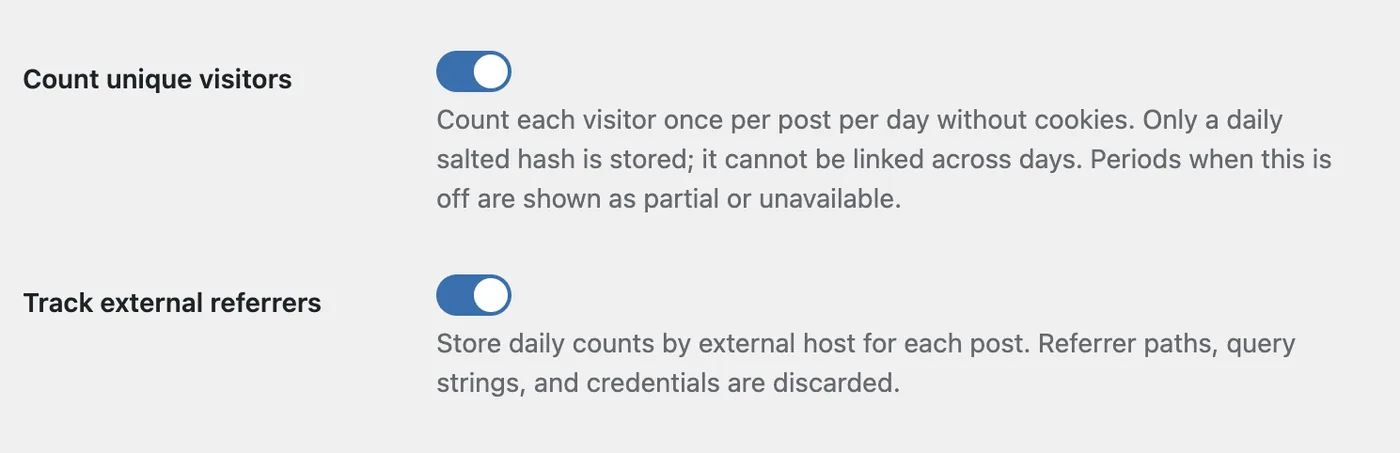
No cookie is set and nothing is stored in the browser. When a view is recorded, Top 10 builds a hash from the visitor’s IP address, the browser’s user agent, the post ID, the site ID and a random salt generated for that site and day.
The marker stores the hash alongside the post, date and first hour. The daily salt is stored separately. The IP address and user agent are used during the request and are not written to the database.
A new salt is created each day. When the next day’s first visitor is recorded, Top 10 attempts to delete older salts and clears old hashes in batches as visits arrive. Scheduled maintenance also clears old markers if enabled.
Once the old salt has been deleted, yesterday’s hash cannot be recreated using it. The daily hashes are designed not to link a visitor across days.
Top 10 uses the address PHP reports for the request, REMOTE_ADDR. If your site is behind a CDN or reverse proxy, make sure your server restores the visitor’s real address. Otherwise many readers share one address and are counted as fewer visitors.
The design decides what the number means. The total is the sum of daily unique visitors for a post:
- A reader who opens the same post five times on Monday counts once.
- The same reader opening it again on Tuesday counts once more.
- A reader who opens two different posts on the same day counts once for each post.
A day is a calendar day in your site’s timezone. The result estimates daily visitors to each post. People sharing an address and user agent can be counted together, and changes to either can cause one person to be counted more than once. It is not a count of unique people across your whole site.
Where the numbers appear
If you turn on Count unique visitors in Top 10 Pro, Top 10 → Popular Posts gains two sortable columns: Total unique visitors and Unique visitors in period. The second follows the date range selected at the top of the table, which is today unless you change it.
Developers can remove the columns with the manage_pop_posts_columns filter, or switch off the admin visitor reporting with tptn_admin_unique_visitors_enabled.
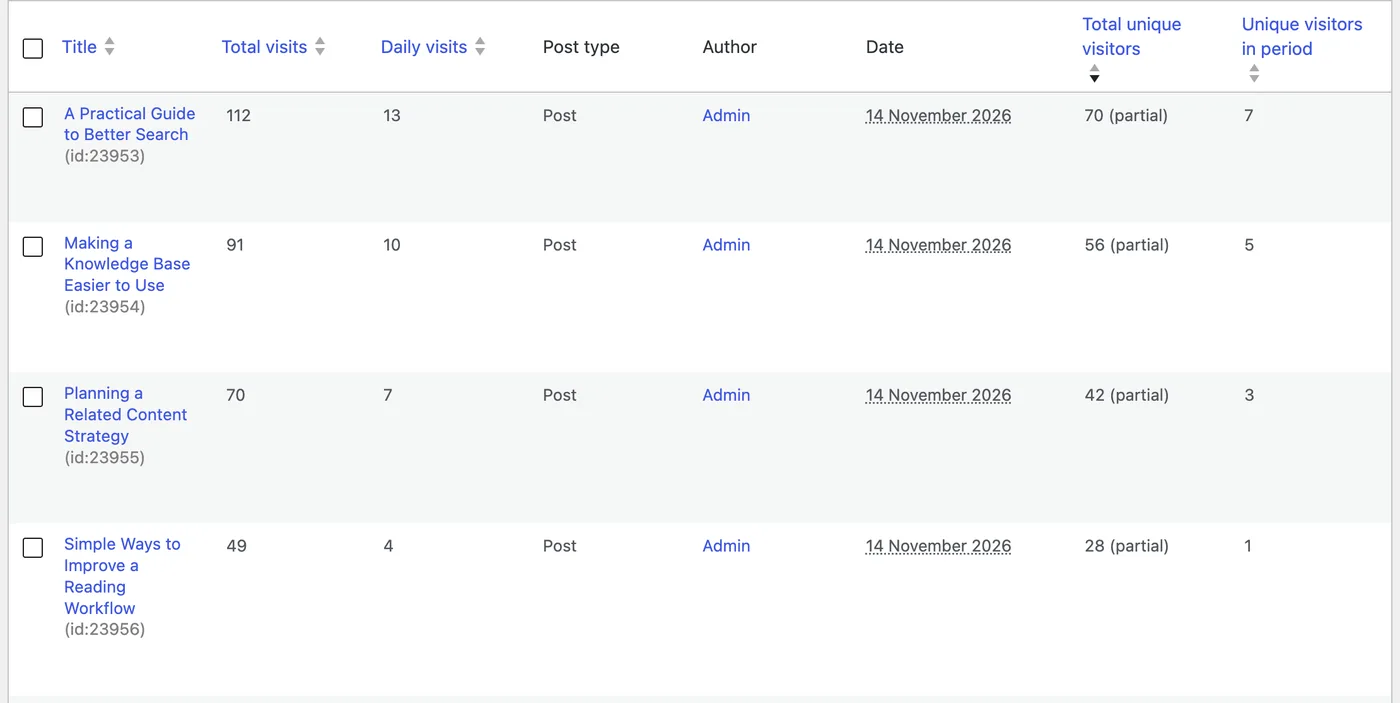
Example counts from a local test site.
If Display admin columns is enabled on the General tab, the Posts and Pages lists get a sortable Unique Visitors column with each post’s lifetime total. The Top 10 dashboard widgets add the visitor count after each post’s views.
wp top10 popular prints a new Visitors column and accepts --orderby=visitors. The wp top10 command guide covers the other options.
The Abilities API returns the same data. top-10/get-popular-posts adds visitors and visitor_coverage to each post. top-10/get-post-views adds total_visitors, daily_visitors, total_visitor_coverage and daily_visitor_coverage. See the Top 10 Abilities API reference for the existing fields.
Sort popular posts by unique visitors
Once counting is enabled in Top 10 Pro, lists can rank posts by unique visitors instead of views. This rewards posts that reach many readers over posts that a few readers reload often.
In the Advanced Popular Posts block, open the Results panel and set Order by to Unique visitors.
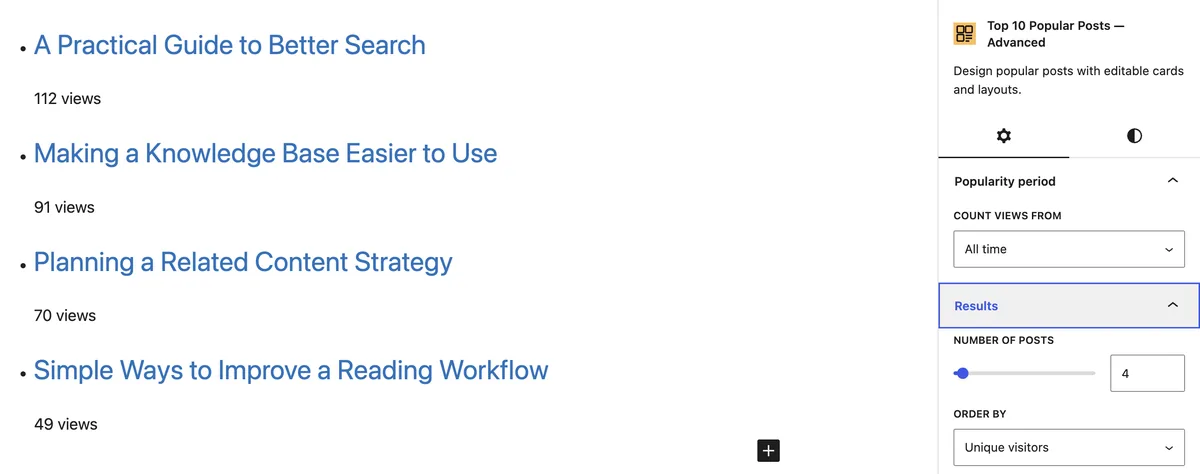
The Popular Posts [Top 10] widget has a new Order posts by dropdown with the same choice. In a shortcode, pass orderby:
Views remain the default order everywhere, so existing lists don’t change. The Unique visitors option appears in the block and widget only while Count unique visitors is on. Sorting by unique visitors needs Top 10’s own counts, so it doesn’t apply to lists that use Koko Analytics as their data source.
Partial and unavailable coverage
Unique visitors can only be counted from the moment you enable the setting. Every view recorded before then has no visitor data, and a lifetime total that looks complete when it isn’t would mislead you. Top 10 Pro records which days were fully measured and labels the result.
| What you see | What it means |
|---|---|
| A number with no label | Coverage is complete for the period. |
| A number followed by (partial) | Some of the period was measured. The number is a minimum. |
A dash in admin tables, Unavailable in WP-CLI, null in the Abilities API | Coverage is unavailable for the period. This includes periods before counting began and a single day that reached the visitor marker limit. |
The dashboard widgets leave the visitor count out when it is unavailable.
On a site that already had view counts when visitor coverage began, lifetime totals show (partial). This is expected. A period that starts the day after counting began, with no interruptions, has no label.
A period is also marked partial if Count unique visitors was switched off or Top 10 Pro was deactivated during it, or if a view arrived without a usable IP address or user agent. While the setting is off, the unique visitor columns are hidden.
There is one more case on very busy sites. Top 10 Pro stores at most 16,384 new visitor hashes in each of 64 groups per site per day, 1,048,576 in all, so the table can’t grow without limit. When any one group fills, views are still counted but unique visitors stop for the rest of that day, even if the other groups have room.
A day that hit the limit shows as unavailable on its own, and longer periods that include it show as partial. Developers can change the per-group limit with the tptn_unique_visitor_marker_shard_limit filter. If you use the High-traffic tracker, regenerate its config file afterward.
External referrer tracking
The second addition answers where readers came from. Track external referrers sits on the same Counter/Tracker tab and is off by default.
When it is on, Top 10 Pro stores a daily count for each post and referring site. Only the scheme and host are kept, such as https://google.com or https://news.ycombinator.com. The path, query string, fragment and any credentials in the URL are discarded in the visitor’s browser before the tracking request is sent, and the value is validated again on the server.
A few rules keep the report clean:
- A leading
www.is removed, sowww.example.comandexample.comcount as one source. - The scheme is kept, so the
httpandhttpsversions of a site are listed separately. - Referrers from your own site are ignored. This report covers external sources.
- Only
http,https,android-appandios-appreferrers are accepted.
Views that arrive with no referrer, such as bookmarks, typed addresses and links from sites that send none, are not in the report. The referrer counts will not add up to your total views.
The reports are in three places:
- Top 10 → Referrers lists the top 100 sources for the site. The menu item appears after the setting has been enabled.
- Top 10 → Popular Posts shows an External referrers table below the posts list, with the top 20 sources for the selected date range.
- The Top 10 metabox on the post edit screen lists the top ten sources for that post under External referrers.
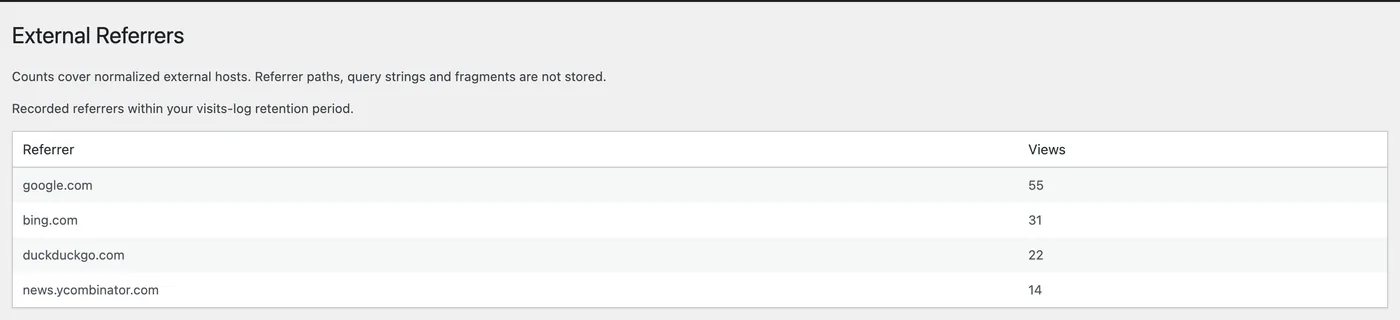
Example referrer data from a local test site.
Referrer counts follow the visits log retention. If Enable scheduled maintenance is on under Top 10 → Settings → Maintenance, scheduled cleanup removes older data using a default retention of 30 days, or the number of days set in Visits log retention period. With scheduled maintenance off, they are kept until you turn it on. See Top 10 maintenance options for how retention works.
Works with every tracker
Both features work with all tracker types, including the Fast and High-traffic trackers, and with both Funnel tracking and Legacy tracking. A recorded view and its available visitor marker or referrer data are handled transactionally. Funnel tracking aggregates the recorded data into reports afterward.
If you use the High-traffic tracker, its config file needs new values. Top 10 Pro attempts to regenerate an existing config when an administrator with manage_options opens an admin page after the update. Until an older config is updated, the endpoint falls back to the Fast tracker. If regeneration fails, check the config status under Counter/Tracker and regenerate it.
Settings import and multisite fixes
These fixes are in both the free plugin and Top 10 Pro.
Importing a partial settings file deleted every setting that wasn’t in the file. The import on Top 10 → Import/Export replaced the whole settings array with the file’s contents. It now merges the file into your existing settings and runs every imported value through the same sanitization as the settings page.
Backslashes disappeared from Custom CSS. Icon font codes such as content: "\f101" lost their backslash on the front end and again on settings import, which broke the icon. Backslashes are now preserved in both places.
Other fixes in this release:
- Thumbnails without alt text now output an empty
altattribute, so screen readers skip decorative images. - Popular posts lists avoid unnecessary post metadata lookups when preparing ranked posts, reducing database work.
- Saving an array to a single-value setting no longer causes a fatal error.
- On multisite, site administrators can no longer export or import other sites’ view counts. Network-wide exports and imports now require the Network Admin Import/Export screen and the
manage_network_optionscapability. - Importing WordPress Popular Posts data into another site on the network also requires
manage_network_options.
Upgrade notes
Top 10 v4.7 requires WordPress 6.8 or later and PHP 7.4 or later.
The database upgrade runs automatically the next time an administrator opens an admin page. In both the free plugin and Top 10 Pro, it adds a visitors column to the two count tables and an is_unique column to the visits funnel table.
Top 10 Pro also creates four tables for unique visitors. Enabling Track external referrers creates two more tables and adds a referrer_host column to the funnel table.
What to check after updating Top 10 Pro:
- Enable Count unique visitors under Top 10 → Settings → Counter/Tracker if you want unique visitor counts. When it is on, each visitor’s IP address and user agent are processed during the request.
- Enable Track external referrers on the same tab if you want referrer reports. Both settings are off by default, and nothing is collected until you turn them on.
- Review your site’s privacy information for the features you keep enabled.
- If you use the High-traffic tracker, load an admin page as an administrator and check that the config has been regenerated.
If Delete counter data on uninstall is enabled, uninstalling the plugin also removes the new unique visitor and referrer tables.
If you’ve ever looked at a popular post and wondered whether it was popular with many readers or with a few very keen ones, sort your list by unique visitors after a week of data and compare.