

Better Search v4.6: Searches with no results, Abilities API tools and more
A search that returns nothing can sometimes be more useful than one that returns something. The visitor told you exactly what they wanted and your site had no answer. Until now, Better Search logged the search but not that it failed. The popular searches list shows what people look for, not whether they found it.
Better Search 4.6 starts counting those searches. I’ve also tightened what the search tracker accepts, added 16 abilities for the WordPress Abilities API in Pro and given AI answers a separate budget for visitors who aren’t logged in.
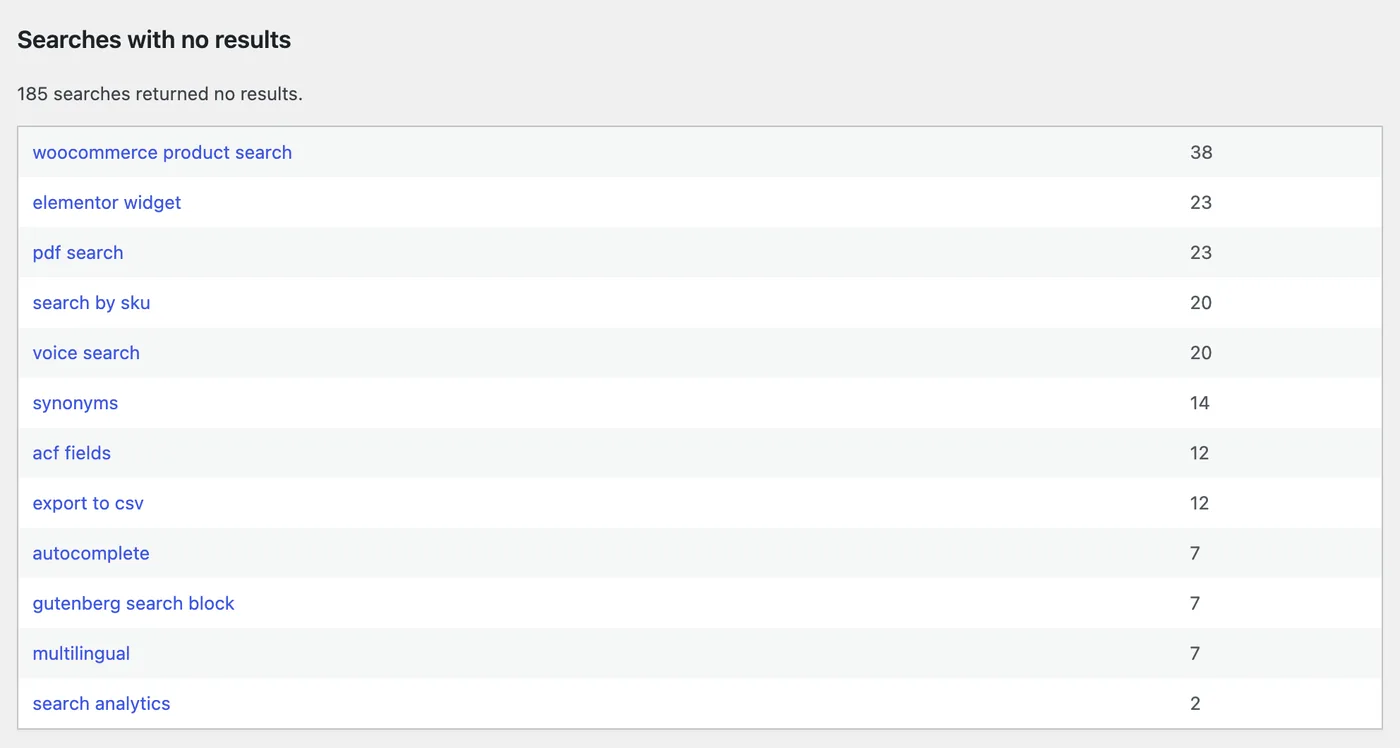
Searches with no results
The dashboard at Better Search → Dashboard now has a Searches with no results section for each period. It tells you how many searches in that period returned no results.
Only searches the tracker logs are counted, so the count follows your search tracking settings, including the per-minute limit described below. If Enable search tracking is off, nothing is counted.

The free plugin stores only the number of empty searches per day in a new bsearch_no_results_daily table. It doesn’t store the terms.
Counting starts when you update. Earlier periods show nothing because the data was never collected.
The terms behind the count in Pro
Better Search Pro records which searches those were, in a second new table called bsearch_no_results. Under the count, the dashboard lists the top 20 terms for the period and how many times each was searched. Each term links to that search on your site, so you can check what a visitor sees today. Clicking one runs a real search, so it is counted again unless Track admin searches is off.
Click a bar on the dashboard chart and the drill-down shows the terms with no results for that day alone. On multisite, the network dashboard shows them across the network.
Terms are recorded from this version onward. If a period has a count but no terms, the dashboard says so rather than showing an empty table.
This is the list to work from. A term on it is a candidate for a new article, a search redirect or a closer look at fuzzy matching and Did You Mean.
A stricter search tracker
Search tracking runs from the visitor’s browser after the results page loads, which means anything can send it a request. In 4.6, the tracker checks more before it writes to the log:
- Terms are cleaned, and a term containing any word in Filter these words on the Search tab isn’t logged.
- The tracker itself now checks Enable search tracking, so a direct request can’t add to the log when tracking is off.
- Terms longer than 100 characters are rejected.
- Known crawlers and scripts are excluded. This is a new setting, Exclude bots from search tracking, and it is on by default.
There is also a rate limit. Search tracking limit per minute caps how many searches are added to the log each minute across the site, and defaults to 20. Searches still run past the limit, but they aren’t logged. Logging resumes in the next minute.
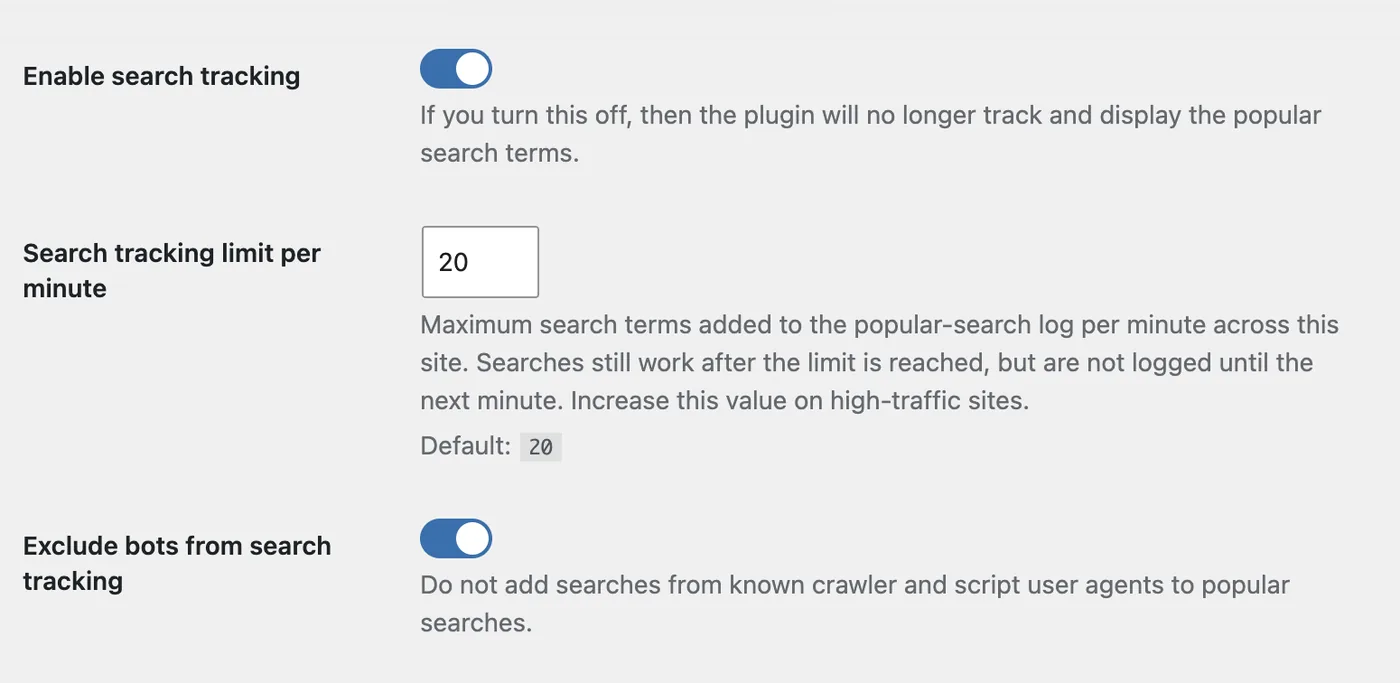
If your site is quiet, you won’t notice the limit. If it regularly sees more than 20 searches a minute, raise the setting or use the bsearch_tracker_rate_limit_per_minute filter; otherwise, your popular searches will be undercounted.
Terms that were already in the log before you added them to Filter these words no longer appear in heatmaps. In Pro, they are also excluded from Did You Mean suggestions.
Abilities API tools in Pro
Better Search already registered a search ability, and Pro added abilities for popular searches, clearing the cache and spelling suggestions. Version 4.6 adds 16 more in Pro for managing the plugin, so an AI agent or any other Abilities APIOpens in a new window client can do much of what previously needed WP-CLI or the admin screens.
| Area | Abilities |
|---|---|
| Cache | better-search/get-cache-status, better-search/list-cache-keys, better-search/set-cache-enabled |
| Database | better-search/get-database-status |
| Custom index | better-search/get-custom-index-status, better-search/set-custom-index-enabled |
| Statistics | better-search/get-search-statistics, better-search/clear-search-statistics |
| Settings | better-search/get-setting, better-search/update-setting, better-search/export-settings, better-search/import-settings |
| Stopwords | better-search/list-stopwords, better-search/add-stopwords, better-search/remove-stopwords, better-search/clear-stopwords |
The stopwords abilities manage the Filter these words list.
Every one of them requires the manage_options capability. Three of them, better-search/clear-search-statistics, better-search/import-settings and better-search/clear-stopwords, also require confirm set to true, so wiping data has to be a deliberate request rather than a side effect.
Most of the abilities and the matching wp bsearch commands now call the same code. One difference: the better-search/import-settings ability always keeps settings that aren’t in the input, like --merge in WP-CLI. Sharing the code also changed how the WP-CLI settings commands validate values, which I’ve covered in the upgrade notes below.
A separate AI budget for anonymous visitors
AI answers in Pro, which are still in beta, have a Daily request cap. Until now, logged-in users and anonymous visitors drew from the same pool, so a burst of anonymous traffic could use the day’s allowance before your members asked anything.
The new Daily cap for anonymous visitors setting is under Limits and logging on the AI (Beta) tab of Better Search → Settings. It sets a point in the day’s provider requests after which visitors who aren’t logged in get no more AI answers. Logged-in users can carry on up to the Daily request cap. Requests from logged-in users count toward that point too. It defaults to 0, letting anonymous visitors use the full daily cap, subject to the hourly limit below.
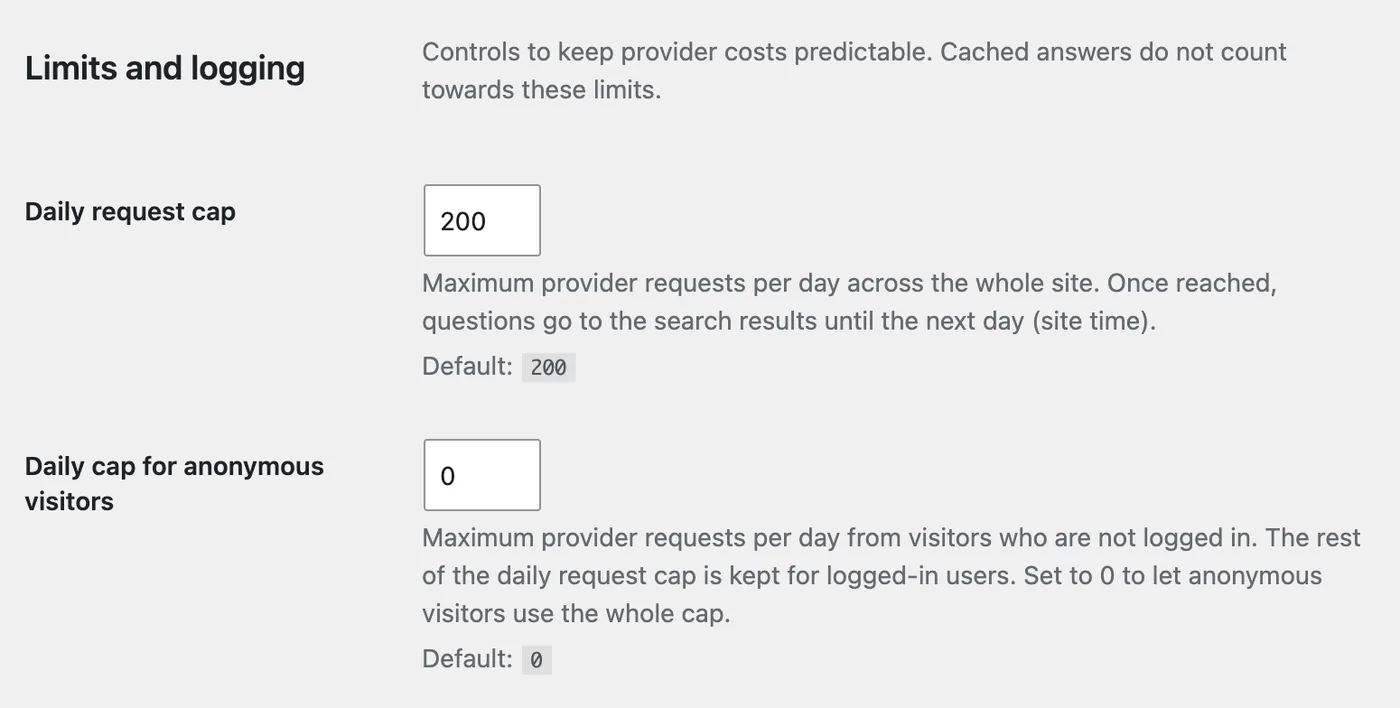
A second limit applies by default. Anonymous visitors can now use at most a quarter of the daily request cap in any one clock hour. With the default cap of 200, that is 50 requests an hour. Use the bsearch_ai_hourly_share filter to change the fraction.
Fixes
Backslashes disappeared from Custom CSS and other settings. If your Custom CSS used an icon font code such as content: "\f002", the backslash was removed when you saved the settings and again on the front end, so the icon never appeared. Settings now keep backslashes through saving, reloading and output. If you worked around this by doubling the backslash, check after updating that each icon code has a single backslash, such as \f002.
Quotes in Custom CSS broke Search Box widget styles. Quotes were converted to HTML entities in the styles added for the widget. They are now output as written.
Importing a partial settings file on Better Search → Tools deleted the other settings. The import now keeps them. Imports are also sanitized in the same way as the settings page, and invalid files are rejected.
Other fixes in this release:
- Thumbnails without alt text now output an empty
altattribute, so screen readers skip decorative images. - Live search messages can now be translated. They used the wrong text domain.
- [Pro] Multisite cross-site search no longer strips GROUP BY, ORDER BY, LIMIT or DISTINCT from inside a visitor’s search term.
- [Pro] Multisite site dashboards showed network-wide searches in the chart and day drill-down.
- [Pro] Multisite cross-site search returned a database error instead of results when the selected sites used different search settings.
- [Pro] Multisite cross-site search could leave the page running as another site, breaking the title, live search and tracking.
- [Pro] Did You Mean crashed PHP on macOS web servers when Use enchant as a fallback was on. Enchant is now skipped there. If you’ve removed Enchant’s AppleSpell provider, use the
bsearch_did_you_mean_enchant_usablefilter to turn it back on.
Upgrade notes
Better Search v4.6 requires WordPress 6.9 or later and PHP 7.4 or later.
Most sites need to do nothing. The new tables are created automatically: one in the free plugin, two in Pro.
Three behavior changes are worth knowing about:
- Busy sites: search tracking is limited to 20 logged searches per minute by default. Raise Search tracking limit per minute if your site sees more than that.
- AI answers in Pro: anonymous visitors are limited to one quarter of the daily request cap per hour by default. Use the bsearch_ai_hourly_share filter to change the fraction.
- WP-CLI in Pro:
wp bsearch settings setandwp bsearch settings importnow validate and sanitize values like the settings page. Unknown settings are skipped with a warning. Check scripts that rely on the previous behavior.