

How Contextual Related Posts Decides Which Posts Are Related
The cheapest way to determine whether two posts are related is to check whether they share a category or tag. It’s fast, and it’s only as good as your taxonomy. A broad category like “WordPress” will happily put a caching tutorial next to a theme review.
I built Contextual Related Posts to compare the words instead. Here’s how it scores candidates in version 4.5.2, what you can tune in the free plugin, and what Pro changes.
The FULLTEXT indexes
On activation, the plugin adds three FULLTEXT indexes to wp_posts: wz_title_content on the title and content, wz_title on the title, and wz_content on the content. MySQL only runs a MATCH against a column list that has a FULLTEXT index on exactly those columns, so each query shape needs its own index.
Without the right index, the relevance query can’t run. Since 4.5.1, the free plugin recreates missing indexes from the admin once per index schema version.
If one disappears later, the Status section on Tools → Related Posts Tools shows it, and Recreate Index rebuilds the set.
How the free plugin scores posts
The free plugin builds one MATCH ... AGAINST expression and uses it to select, filter and rank candidates. With default settings, and without the post type, status and exclusion conditions, it looks like this:
The search text is the current post’s title plus up to 100 words of its content, with shortcodes, HTML and stop words removed. Candidates are scored on their title and content together, as one block of text. There’s no separate title score and no multiplier favoring the title.
Related posts based on title and content controls this, on the List tuning tab under Settings → Related Posts. It’s on by default. Turn it off and the query matches post_title against the current post’s title alone.
Limit the content to be compared caps the content words. Its default of 0 uses the 100-word ceiling set by the CRP_MAX_WORDS constant, which you can redefine in wp-config.php.
MySQL’s natural language mode does the ranking. Words that appear in fewer posts count for more, so on a WordPress blog, sharing “Redis” means more than sharing “WordPress”.
Stop words
Before the query runs, the plugin strips WordPress core’s search stop words, plus “from” and “where”. A post titled “How to Configure WordPress Caching” goes in as “Configure WordPress Caching”.
Minimum relevance
Ranking always returns the best matches, even if they’re weak. Version 4.5.0 added Minimum relevance (% of best match) to the free plugin. It defaults to 0, which turns it off.
For each post, the plugin takes the strongest candidate’s score and drops anything below your percentage of it. Because the bar is relative, the same value works on posts with high and low absolute scores.
A list can end up shorter than your limit. Manually selected related posts, and Pro’s cornerstone posts, are never removed.
On SQLite, which has no FULLTEXT indexes, the plugin falls back to LIKE matching. A post either matches or it doesn’t, so minimum relevance is unavailable there.
What Pro changes
Contextual Related Posts Pro replaces the free plugin. Activating one deactivates the other, and your settings carry over.
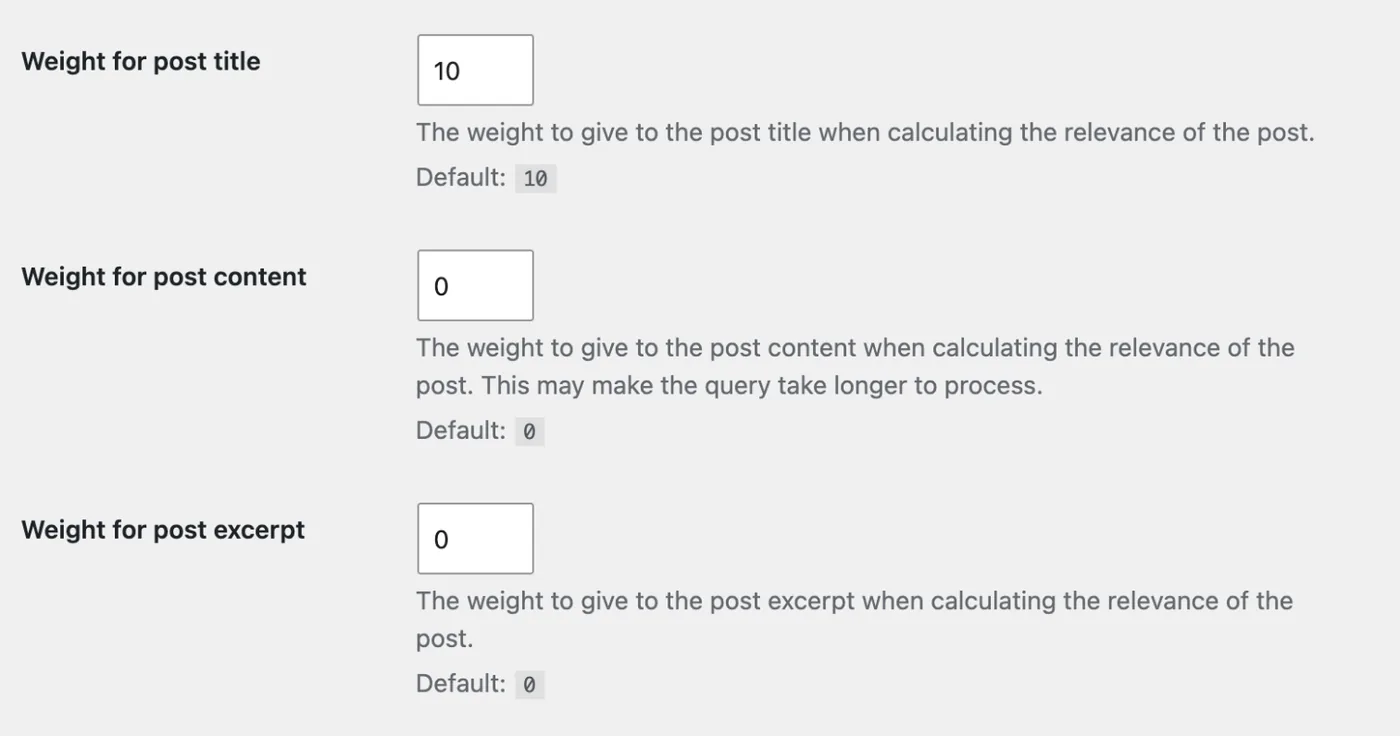
Pro hides Related Posts based on title and content and scores each field separately, as a MATCH per field multiplied by its weight. Weight for post title defaults to 10, while Weight for post content and Weight for post excerpt default to 0.
A zero weight drops that field, so out of the box Pro ranks on the title alone. The excerpt weight uses an extra wz_excerpt index.
Pro can also add taxonomy to the score with Weight for categories, Weight for tags, Default taxonomy weight and Primary term boost. All four default to 0.
Pro 4.5.0 added recency weighting. Recency boost (%) defaults to 0, which turns it off, and Recency half-life (days) defaults to 180. When it’s on, each score is multiplied by 1 + b / (1 + age / half-life), where b is the percentage as a fraction.
A post published today gets the full extra weight, and one as old as the half-life gets half. Recency weighting only affects relevance ordering, and SQLite doesn’t support it. Minimum relevance still uses the raw score.
Pro’s Efficient Content Storage and Indexing (ECSI) can also run the matching against dedicated tables.
When results update
Related lists are cached for a week by default. Since 4.5.0, editing, publishing, or trashing a post clears the cached lists it appears in, and changing minimum relevance or Pro’s weights and recency settings clears the whole cache.
Contextual Related Posts is free on WordPress.org. Once it’s active, compare both matching modes on a few of your own posts.
Better Search applies the same FULLTEXT approach to site search, which I covered in why the default WordPress search returns irrelevant results.
