

Why the Default WordPress Search Returns Irrelevant Results and How to Fix It
I’ve never met a site owner who was happy with WordPress’s default search results. The reason is always the same.
Core search isn’t broken. It does exactly what it was written to do. It just isn’t a search engine. It’s a database filter with a little sorting bolted on top, and once your site grows past a few hundred posts, every visitor who uses your search box can tell.

What core WordPress search actually does
When a search runs, WP_Query::parse_search() builds the WHERE clause. It splits the query into terms, drops stopwords and single letters, then wraps each surviving term in a LIKE '%term%' comparison against three columns: post_title, post_excerpt, and post_content.
Comparisons within a term are joined with OR. The groups for each term are joined with AND:
Three columns. That’s the entire surface area. Since WordPress 6.2, you can narrow it with the post_search_columns filter, but you can’t widen it, because core intersects whatever you pass against its own list of three.
LIKE tells you whether, not how much
LIKE returns a boolean. The word is in the column, or it isn’t. A 4,000-word tutorial built around a topic and a 200-word aside that mentions it once both come back as “yes”, with nothing in the query to tell them apart.
Core does try to compensate. WP_Query::parse_search_order() builds a CASE ladder that ranks the full phrase in the title above all terms in the title, above any term in the title, above matches in the excerpt and content. It was a genuine improvement when it landed in WordPress 3.7.
But it only runs when the query has more than one term, and only when no other orderby has been set. For a single-word search, which is what most visitors type, the ordering collapses to post_title LIKE '%term%' DESC followed by the default post_date DESC. Posts with the word in the title, newest first. Then everything else, newest first.
That’s the whole ranking model. Recency wearing a relevance costume.
If you run a 40-post site, you probably won’t notice. Run a documentation site or a store with a few thousand items and you will.
What relevance scoring adds
A MATCH() AGAINST() query against a FULLTEXT index doesn’t return a boolean. It returns a score based on how often the terms appear in the row, weighted against how common they are across the table. Rare words in short fields score high. Common words scattered through long posts score low.
That gives you a number to sort by, which is what core never had.
Better Search builds that score in the SELECT clause and orders by it:
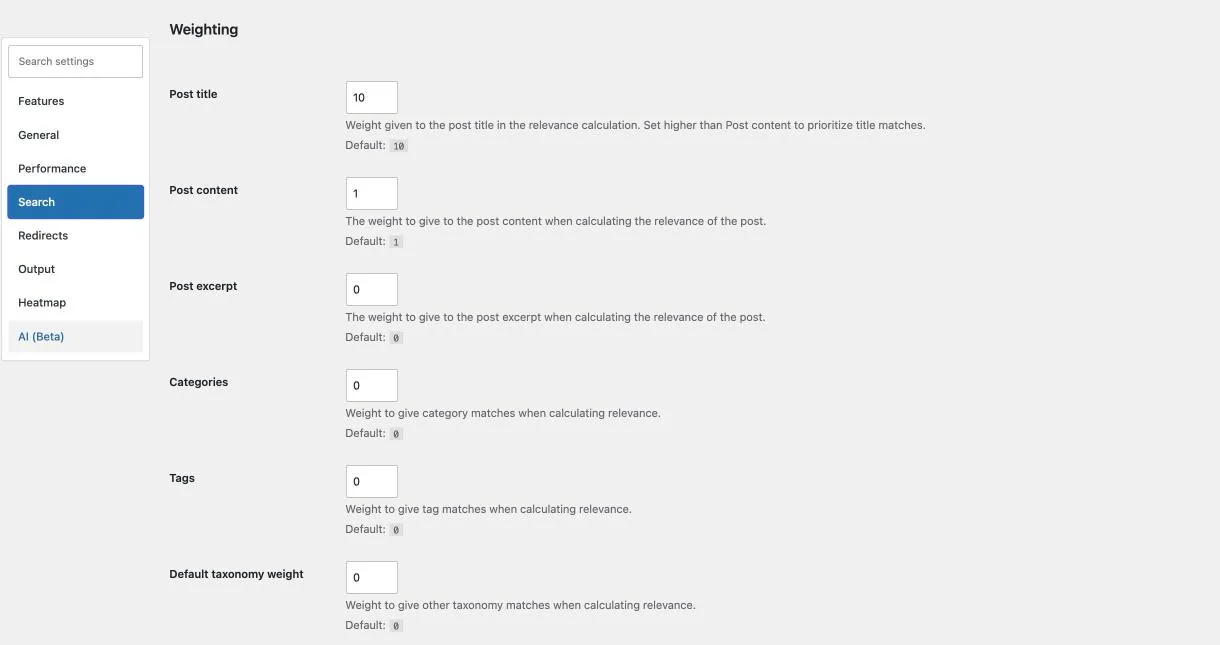
The multipliers are the Post title and Post content weights under the Weighting section of the Search tab. I ship them at 10 and 1, so a title match counts ten times as much as a content match. If you’d rather build the expression yourself, bsearch_posts_match_field hands you the whole thing.
The indexes have to exist for any of this to work, so the plugin adds three FULLTEXT indexes to wp_posts on activation: wz_title, wz_content, and wz_title_content across both columns.
There’s a real trade-off. FULLTEXT ignores tokens below the server’s minimum length, three characters on InnoDB and four on MyISAM, so a two-letter product code returns nothing where a LIKE query would have found it. Pro covers that case with Minimum characters and Enable LIKE fallback. The scoring is documented in full in how the Better Search algorithm works.
Why metadata inclusion matters
Scoring fixes the ordering problem. It doesn’t fix the coverage problem.
Go back to those three columns: title, excerpt, and content. Not categories, not tags, not post meta, not authors, not comments, not even the post slug.
Think about what that excludes. A store where every SKU lives in _sku. A custom post type where the useful information sits in ACF fields and the post content is empty. A blog where half the institutional knowledge is in the comment threads. In each case, the visitor searches for something that is visibly there, and core tells them it doesn’t exist.
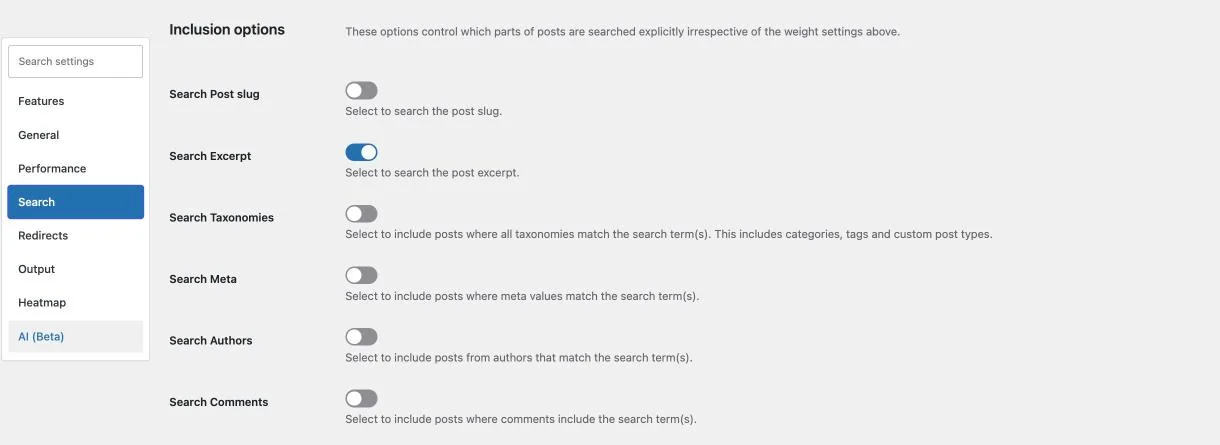
Better Search exposes each of these as a separate option on the Search tab: Search Excerpt, Search Taxonomies, Search Meta, Search Authors, and Search Comments. Only Search Excerpt is on by default.
The rest ship off deliberately, because each one widens the query. Reaching into meta, terms, authors, and comments used to mean joining those tables, and a join multiplies rows by every term, meta row, and comment on a post. On a large wp_postmeta table, that was enough to hit the execution time limit. All four now run as correlated EXISTS subqueries, which check only the rows belonging to each candidate post and stop at the first match, so the row count stays bounded. I wrote up the first step, meta and comments in FULLTEXT searches, in How I Optimized Better Search Queries. Version 4.5.0 finished the job for authors and for LIKE searches.
Cheaper isn’t free, so turn on only the ones you need. The full list is in the Search settings reference.
What changes, and what doesn’t
Better Search doesn’t replace the search page. It filters the query behind it. With Enable seamless integration on, which is the default, your theme’s own search template renders the results exactly as it always did. Same markup, same styling. The posts are just in a different order, because the query underneath them now has a score column to sort on.
It doesn’t understand meaning, though. Relevance scoring is statistical, not semantic. MySQL counts words, and no amount of weight tuning will teach it that “car” and “automobile” are the same thing.
Two Pro features cover the edges of that gap, both toggled on the Features tab. “Did you mean” suggestions, off by default, read your own search log and offer a correction when a search returns nothing, in either Suggest or Auto-correct mode. Search redirects, on by default, send a chosen keyword straight to a post, page, or URL, which is the honest answer when you already know where that visitor should land.
The Enable cache setting on the Performance tab is on by default. On a busy site, leave it that way.
Everything here is in Better Search v4.5, and everything except the Pro features I’ve marked is in the free WordPress.orgOpens in a new window plugin. Pro replaces the free plugin rather than running alongside it: activating one deactivates the other, and the settings carry across. Install it, activate it, and your theme keeps working. For setup, from the wizard to the heatmap, follow my guide to replacing WordPress default search with relevance-based results. Results stop being sorted by accident.
