

Knowledge Base v1.7.0
I’ve uploaded Knowledge Base v1.7.0 into the WordPress.org repository. This version of my Knowledge Base plugin adds some new features and fixes a minor bug.
You can upgrade the plugin from within your WordPress dashboard. As always, redirect any support questions to the forumOpens in a new window.
New alerts shortcode
I’ve introduced a new shortcode The plugin is designed to automatically add the Knowledge Base styles on the page where the shortcode is used across your WordPress blog. The shortcode takes three parameters: Example code to display an alert / informative text is: In the settings page under the Output tab, you will find two new options to customise the output. The first option will allow you to include the sidebar of your theme in the knowledge base. This only works on the default templates included in the plugin. Only include this if your theme doesn’t automatically call the sidebar. You might also need to make changes to the styles depending on the theme. The second option allows you to also include empty sections in the knowledge base listings. This is useful if you are setting up your knowledge base and want to show the various sections that they knowledge base will contain.wzkb-alert (always present) and alert (overwritten by this shortcode attribute)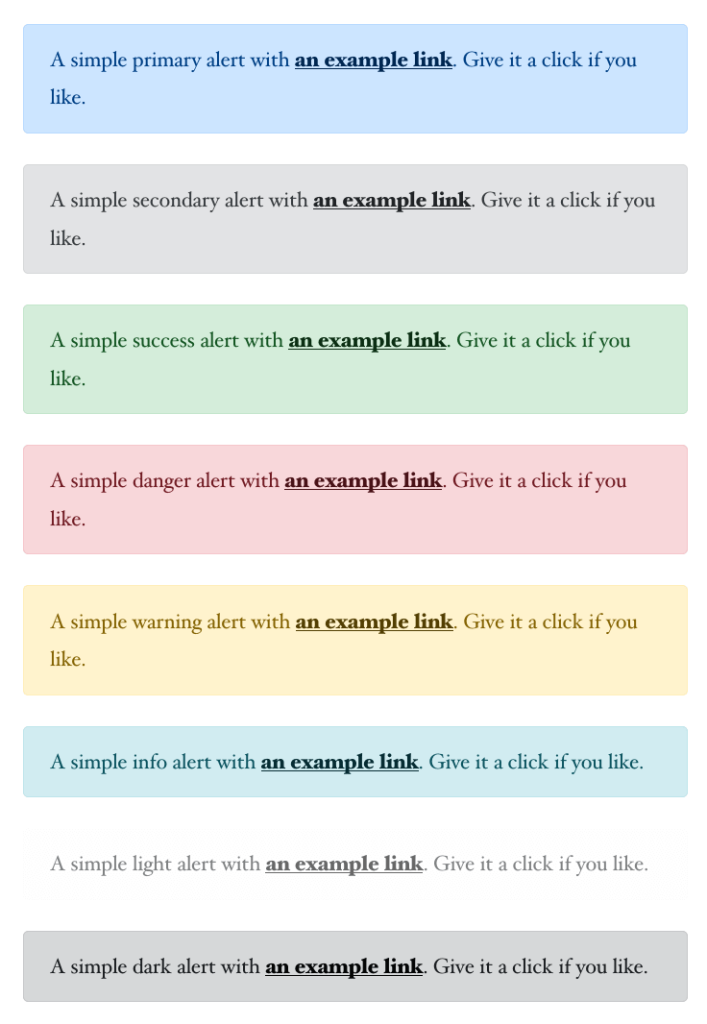
New Output options
Changes in Knowledge Base v1.7.0
to display alerts / informative messages similar to BootstrapOpens in a new window. The types of alerts are primary, secondary, success, danger, warning, info, light and dark