

Top 10 v4.6.0: Koko Analytics Data Source, Abilities API and More
Top 10 has always counted its own views. If you also run Koko Analytics, that means two trackers on every page and two sets of view counts for the same posts.
Version 4.6.0 lets Top 10 build its popular posts lists from Koko Analytics data instead, and optionally switch off its own tracking. I’ve also added support for the WordPress Abilities API, made cached lists refresh when the underlying counts change, and fixed a cache bug that meant the query cache was never reused. Top 10 Pro gets a new Advanced Popular Posts block and a feed vs web report on the dashboard.
This release also fixes two ways password-protected content could leak through popular posts lists, so I recommend updating. One behavior change affects multisite networks on the free plugin. I cover both below.
Use Koko Analytics as your data source
Free and Pro.
Koko Analytics records page views per post per day. Top 10 now reads those page views directly from Koko Analytics’ database table. You don’t need to change any Koko Analytics settings.
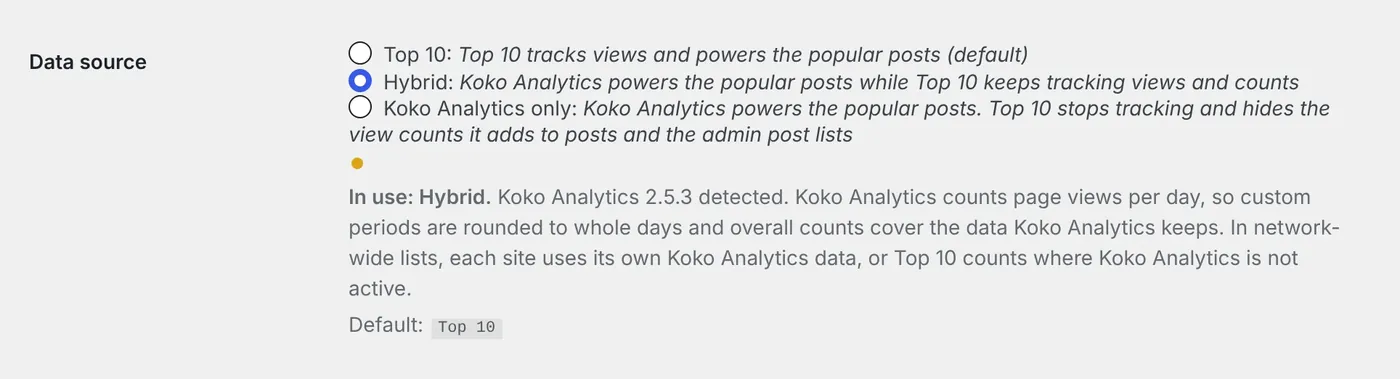
Go to Top 10 → Settings → Counter/Tracker and choose one of three options under Data source:
| Mode | Popular posts lists use | Top 10 tracking |
|---|---|---|
| Top 10 (default) | Top 10 view counts | On |
| Hybrid | Koko Analytics page views | On |
| Koko Analytics only | Koko Analytics page views | Off |
Start with Hybrid. Top 10 keeps tracking, so its post counters, admin columns and statistics stay current, and you can switch back without a gap in your Top 10 data.
Koko Analytics only mode goes further. Top 10 stops loading its tracker script, its tracker endpoints ignore requests (including the Pro Fast and High-traffic trackers), the feed tracking pixel is removed, and the view counts Top 10 adds to posts and to the admin post lists are hidden.
In both Koko modes, every popular posts list reads Koko Analytics page views: the [tptn_list] shortcode, the Top 10 Popular Posts block, the legacy widget, the popular posts feed and the REST API. Your list settings for post types, exclusions, categories, post age and post count still apply.
A few details are worth knowing before you switch:
- Koko Analytics stores one row per post per day, so custom periods round to whole days. Overall counts cover only the data Koko Analytics still holds, so its automatic data cleanup affects them.
- If Koko Analytics is deactivated, Top 10 falls back to its own counts and resumes tracking. An admin notice tells you what happened. Top 10 has no views for the period its tracking was off.
- The Data source description shows the mode in use and the detected Koko Analytics version. Lists from the shortcode, the block and the legacy widget also carry a
data-tptn-sourceattribute on their wrapper, set tokokoortop10.
Developers can override the decision per query with the tptn_query_use_koko_analytics filter. The Koko Analytics data source guide covers the date matching and multisite behavior in full.
Abilities API support
Free and Pro. Requires WordPress 6.9 or later.
Top 10 now registers two read-only abilities with the WordPress Abilities API, under a shared webberzone category:
top-10/get-popular-postsreturns the most-viewed posts with their ID, title, URL and views. It accepts a count (up to 100), anoverallordailyperiod, post types and a daily range.top-10/get-post-viewsreturns the total and daily views for a single post.
Both require the read capability. The popular posts ability excludes posts the current user can’t read, and the post views ability rejects requests for those posts. They’re exposed through the abilities REST API, so a configured WordPress MCP Adapter server can offer them to AI clients.
Top 10 Pro adds two write abilities: top-10/edit-post-count to set or reset a post’s lifetime count, and top-10/clear-cache to clear cached Top 10 results. Both need manage_options and an explicit confirm: true in their input.
The Abilities API setting under Top 10 → Settings → Features is on by default and works independently of the Top 10 REST API endpoints. On WordPress 6.8, nothing changes. The Top 10 Abilities API reference has the full input schemas and examples.

The Advanced Popular Posts block
Pro only.
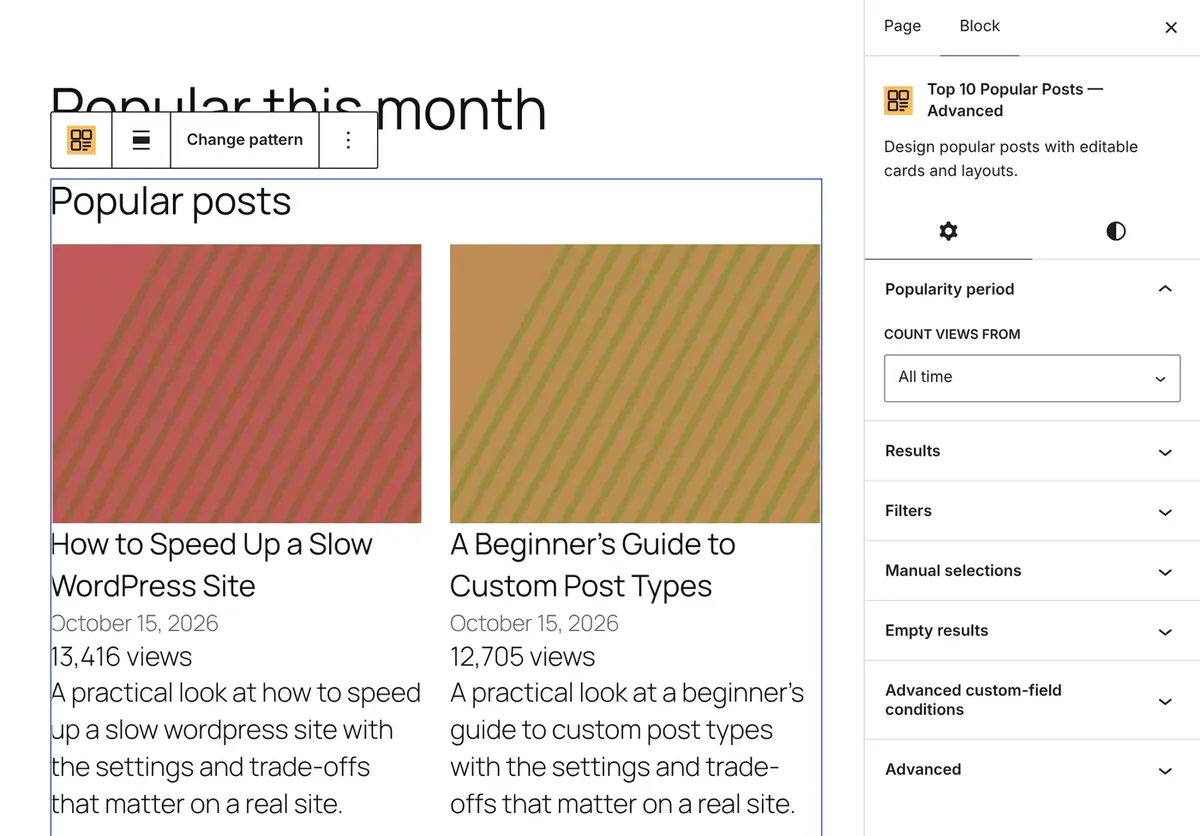
The new Advanced block lets you design one post card from editable blocks, and every result in the list follows that card. You choose which posts appear by popularity, period and filters.
Insert the block, pick one of six layout patterns, then edit the card inside the Popular Posts Template block. The patterns range from a plain-text list to image, title and excerpt cards and rounded thumbnails. You can rearrange the Popular Post Image, Title, Date, Excerpt and Views blocks inside the card, and set columns, minimum card width and gap from the Layout controls.
Choose the popularity window under Count views from: all time (the default), recent days and hours, or a fixed date range. You can filter by post type, author, taxonomy terms, specific posts and up to ten custom-field conditions, and order by something other than views when needed.
When there are no results, the block hides the section by default. Switch to Show the empty state if you want a message instead.
You can convert supported Top 10 Query Loop blocks to the Advanced block from the block toolbar. Existing Query Loop blocks keep working if you leave them alone.
The block is enabled by default under Top 10 → Settings → Features. The Advanced Popular Posts block documentation lists every control and its limits.
Feed vs web on the dashboard
Pro only.
Top 10 Pro has been able to count views from feed readers through a tracking pixel for a while, but those views were folded into the regular count. Version 4.6.0 adds a Feed vs web tab to the Top 10 dashboard that separates them.
The summary shows feed views, web views, the total and the feed share for the last 7 days, the last 30 days and all time. Two lists rank the top ten posts read via feed over the last 30 days and all time. On multisite, the Network Admin dashboard combines counts across sites.
You need to turn on Track feed views in Counter/Tracker settings. It’s off by default. Feed views remain part of the regular counts; the report only separates their share. Readers that block remote images don’t load the pixel and aren’t counted, so these figures are not subscriber counts.
The upgrade adds a feed count column to the count tables and backfills historical feed views from the visits log in the background. Only visits still in the log can be recovered, and Legacy tracking doesn’t populate the log. See feed vs web statistics for what happens when the database can’t add the column automatically.
Count exports in both versions now include a trailing Feed Visits column when feed data is available, and imports restore it.
Fresher lists and faster daily queries
Free and Pro.
The popular posts query cache was never reused. Its key included the current time, so it changed every second and every request built a new cache entry. The key now ignores the generated end time, so cached queries are actually served from the cache.
Cached lists also refresh when their underlying data changes. Previously, a cached list stayed as it was until Time to cache expired. Now Top 10 invalidates the cache when its view counts are updated, set or deleted, and when a post changes. With the default funnel tracking method, count updates happen when buffered views are merged into the count tables. Koko Analytics updates don’t trigger this.
Daily popular posts queries now add up view counts per post first and only then join the posts table. On sites with a large daily table, that does less work per query.
Network-wide lists now need Pro
Behavior change for free multisite users.
Popular posts lists that include other sites in a network through the blog_id argument are now a Pro feature. In the free plugin, every list now queries only the current site.
If you use the free plugin on a single site, nothing changes. If you run a network and rely on cross-site lists, those lists will show only the current site’s posts after you update. Top 10 Pro keeps them working, and in the Koko modes each site in the list uses its own Koko Analytics data or falls back to its Top 10 counts. The free vs Pro comparison lists the other network features.
Security fixes
Free and Pro.
Both fixes concern password-protected posts that appear in popular posts lists.
Unlocked excerpts could reach other visitors. After a visitor entered a post’s password, a list rendered for them could include that post’s unlocked excerpt and be saved in the output cache. Other visitors were then served the cached list. Top 10 now skips the cache for anyone who has entered a post password, and lists cached before the update are no longer used.
Thumbnails could show images from protected posts. When a protected post had no featured image, Top 10 could pick its thumbnail from images inside or attached to the post before the password was entered. It no longer looks inside protected posts for a thumbnail.
Thumbnail URLs are also escaped now, so unsafe protocols are rejected.
Other fixes in this release
Bot-generated cached pages no longer stop views from being counted. With Do not track bots enabled, Top 10 used to omit the tracker from pages when the visitor was a bot. If your page cache stored that page, real visitors were served a copy with no tracker. Top 10 now includes the tracker regardless of who requested the page and checks for bots when it records the view.
Custom date ranges use the exact times you set. Ranges like those on the Top 10 dashboard were rounded to midnight or to the hour. They now use the exact start and end times.
Database upgrades no longer re-alter the visits log tables. Every upgrade was issuing column changes on the visits log and funnel tables even when nothing had changed.
Malformed custom thumbnail dimensions no longer cause PHP errors when Top 10 chooses an image size.
Pro fixes for network lists and Popular Authors
Pro only.
Network-wide popular posts lists failed with a database error. That’s fixed, along with three related problems in the same code: cached network lists loaded posts from the current site instead of each post’s own site, and lists dropped posts that shared an ID with a post on another site and looked up translations on the wrong site.
The rest of the Pro fixes affect sites moving off the retired Popular Authors plugin:
- Blocks added with Popular Authors stopped rendering once that plugin was removed. They now render, and you can convert them to the Top 10 Pro blocks.
- Popular Authors widgets set to Overall showed daily counts.
- Themes calling
wzpa_list_popular_authors_args()hit a fatal error once Popular Authors was removed. - Running Popular Authors alongside Top 10 Pro registered its widget twice. Top 10 Pro now shows a notice asking you to deactivate Popular Authors.
Upgrade notes
Update from your Plugins screen as usual. Top 10 v4.6.0 needs WordPress 6.8 or later and PHP 7.4 or later, and is tested up to WordPress 7.1.
For most sites, there is nothing else to do. The data source defaults to Top 10, so lists and tracking behave as before until you choose otherwise.
Check these if they apply to you:
- Free plugin on multisite: review any lists that pull from more than one site.
- Switching to Koko Analytics only: clear your page cache afterward so cached pages stop loading the Top 10 tracker.
- Pro with feed tracking: if the Feed vs web tab asks for a database update, run Add Feed Views Column from Top 10 → Tools during a quiet period, or use
wp top10 db add-feed-columns. On multisite, use the Tools screen in Network Admin.
If you already run Koko Analytics alongside Top 10, try the Hybrid mode first. It’s the quickest way to see whether one set of numbers is enough for your site.