

Introducing FreemKit: Freemius Customers, Routed into the Right Kit Sequence
I’ve sold my plugins through FreemiusOpens in a new window for a few years. If a user opts in, Freemius knows who installed each one, who agreed to hear from me, who started a trial and who paid. It also comes with a Mailchimp integration, which would have been perfect if my newsletter lived in Mailchimp.
It doesn’t. The WebberZone newsletter runs on Kit, and has for several years. I may earn a commission if you sign up for a paid Kit plan through that link. If you’re not on it yet, you can subscribe here (it has one of the most generous free plans).
For a long time, getting Freemius users into Kit meant pulling them across by hand. A manual import is always a step behind: by the time someone lands in Kit, the email meant for their first week is already late.
I wanted that to happen automatically, so I built FreemKit. It runs inside WordPress, listens for Freemius events and puts each person into the Kit forms and tags that match what they just did.
It has been running on webberzone.com since October 12 for Top 10, Contextual Related Posts, Better Search and Knowledge Base. On the first day, I imported all my existing paying customers. Since then, 70 people who opted in through Freemius and 6 new license holders have landed in the right Kit form or tag without me touching a thing.
With the corresponding Kit automations in place, a free user who opts in can start your getting-started sequence, and a new paying customer can start your Pro onboarding.
One webhook URL, every product
FreemKit gives your site a webhook URL: https://example.com/wp-json/freemkit/v1/webhook by default, or https:// if you select Query Variable in FreemKit. You add that URL to each product in the Freemius Developer Dashboard, and every product you sell reports to the same place.example.com/?freemkit_webhook=1
Each product is configured separately under Settings → FreemKit → Freemius, with its own Product ID, Public Key and Secret Key. The secret key is stored encrypted, and FreemKit checks every incoming request against it with an HMAC-SHA256 signature. Requests older than 15 minutes are rejected.
FreemKit queues events for WP-Cron, ignores duplicates and retries failures up to three times after the initial attempt. It processes events immediately if WP-Cron is disabled or scheduling fails.
Free users and paying customers get different emails
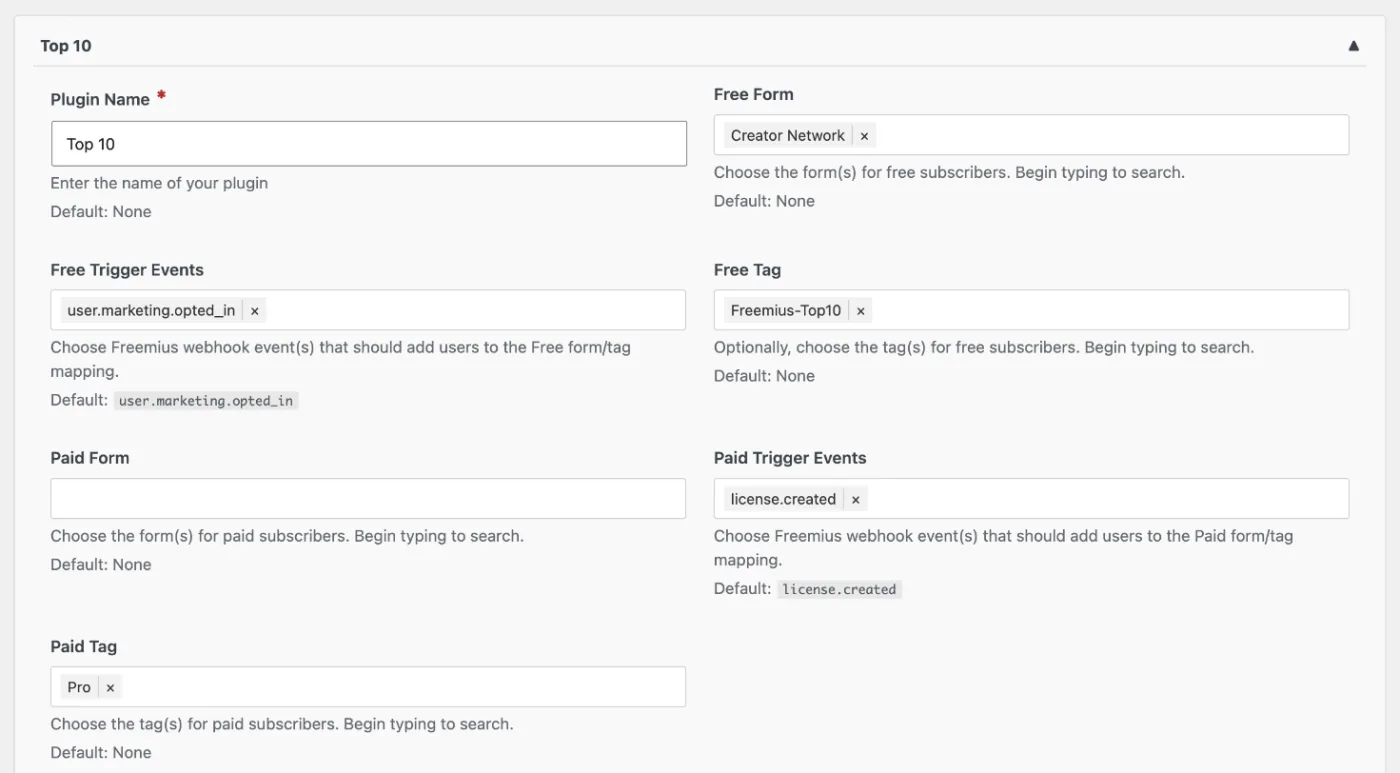
Every product has two routes, free and paid, and each route has its own Trigger Events, Form and Tag.
By default, the free route fires on user.marketing.opted_in, not on install, so your getting-started sequence only reaches people who agreed to hear from you. The paid route fires on license.created. Both are editable per product, so a trial-led plugin could use install.trial.started for the free route and payment.created for the paid one.
Leave a form or tag empty and FreemKit falls back to the Global Form ID and Tag ID on the Kit tab. That keeps a portfolio of plugins manageable: set one default, then override only the products that need their own sequence. The event mapping guide lists the Freemius events you can use.
Consent stays in sync
Email only helps when the person wants it.
Respect Marketing Opt-out is on by default. Configure each Freemius webhook to send user.marketing.opted_out so FreemKit can record the opt-out in WordPress, unsubscribe the person in Kit and block future subscriptions. If they opt back in, FreemKit uses their prior free or paid mapping when available.
Kit gets the final word. If Kit reports a subscriber as canceled, bounced or complained, FreemKit records that locally and does not force them back onto your list.
Bring the customers you already have
Webhooks only cover what happens after you connect them. For everyone who installed or bought before that, Tools → FreemKit Sync imports customers straight from the Freemius API.
The sync defaults to the safe option: the destination starts as Local database only (no Kit push), with Paid selected under User Types. Import, check the records, then sync again from the local database with Kit as the destination. The sync guide covers every option.
See what happened in WordPress
FreemKit stores subscriber records under Users → Subscribers, where you can search, filter, edit and export them.
The Audit Log is enabled by default. It keeps the most recent 200 entries with email addresses masked, usually enough to answer “why didn’t this customer get the email?”
FreemKit also includes WP-CLI commands for status, subscribers, sync, settings, the webhook queue and the audit log. Start any import with a dry run:
The WP-CLI reference for FreemKit covers every command.
What FreemKit doesn’t do
FreemKit doesn’t write or schedule emails. Kit does that. FreemKit decides who goes where.
Each WordPress installation connects to one Kit account, so brands with separate Kit accounts need their own site. And Freemius has to reach your site: a firewall that blocks incoming webhooks means no events.
Getting started
FreemKit needs WordPress 6.6 or later, PHP 7.4 or later, a Kit account and at least one product sold through Freemius.
- Install the plugin, activate your license and follow the setup wizard.
- Connect Kit from the Kit tab. If the official Kit plugin is already connected on the site, FreemKit reuses its connection.
- Copy the webhook URL from the Freemius tab into each product in Freemius, then add the product with its keys and click Validate Keys.
- Set the forms and tags for the free and paid routes.
- Use Tools → FreemKit Sync to bring in existing customers.
The installation guide covers each step.
FreemKit is a premium plugin. Annual licenses cost $99 for one production WordPress site or $199 for unlimited production sites. Both include every Freemius product you connect.
BF2026 takes 40% off the first annual payment. The offer expires December 7, 2026.You’ll find the details on the FreemKit page.
If you already sell with Freemius and email with Kit, I’d like to hear which events you route first. Keep on building.