

Contextual Related Posts 4.2.0: WooCommerce, WP CLI support and more
On busy WordPress sites, related posts need to load quickly, be relevant, and respond intelligently when the server is under load. Version 4.2.0 focuses on improving exactly that, shaped by user feedback and real-world usage.
Along the way, I’ve made multisite management easier, added preliminary support for related products in WooCommerce stores, and introduced WP-CLI support for those who prefer working from the command line.
Most of the new features have been focused on Contextual Related Posts Pro.
WooCommerce integration for product‑focused sites
WooCommerce stores have different needs from content‑driven blogs. Generic related post logic often falls short when applied to product catalogues.
In Contextual Related Posts Pro v4, I introduced Efficient Content Storage and Indexing (ECSI), which stores processed post data in custom tables. This also forms the bedrock of Better Search Pro’s Multisite search feature.
In this release, Contextual Related Posts Pro includes a dedicated WooCommerce integration built on ECSI.
For store owners, this enables:
- Targeted product indexing using titles, descriptions, short descriptions, and custom keywords
- Merchandising‑ready output, including thumbnails, sale badges, prices, ratings, and optional add‑to‑cart controls
- Catalog‑aware filtering, such as limiting results to the same product category or excluding out‑of‑stock items
If you have WooCommerce installed, you will see a new WooCommerce tab in the Related Posts Settings screen.
You can choose whether CRP Pro complements WooCommerce’s native related products or replaces them entirely. The emphasis is on relevance and performance, not visual novelty.
Introduced WP‑CLI support
This release adds WP‑CLI support to Contextual Related Posts Pro, enabling you to manage performance, caching, and content processing entirely from the command line.
All commands support consistent argument parsing, multisite usage (including the --url parameter), and proper error handling. Whether you are warming caches ahead of a campaign or validating indexes across a network, everything can be scripted without touching the admin interface.
Multisite management for large networks
Managing related posts settings across a multisite network can become tedious very quickly. Network administrators running the Pro version can now copy Contextual Related Posts settings between sites directly from the Network Settings page.
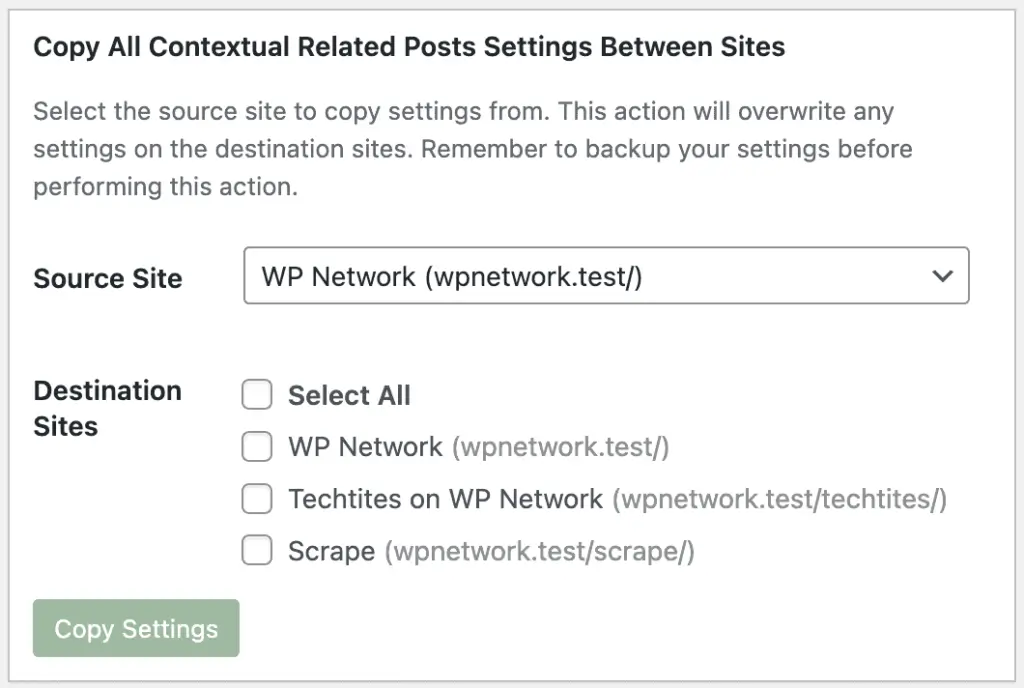
Choose a source site, select one or more destination sites, and the entire configuration is mirrored automatically. This is particularly useful when:
- Launching new sites within a network
- Auditing or standardising settings across existing sites
- Maintaining a consistent experience across a large group of properties
Performance safeguards for high‑traffic sites
Database slowdowns are inevitable, particularly on shared hosting or during traffic spikes.
CRP Pro v4.2.0 introduces a Server Load Threshold setting that monitors MySQL connection pressure and automatically skips CRP queries when the database is under stress. Once load levels return to normal, CRP resumes automatically.
This works alongside the Bot Protection feature, which short‑circuits CRP output for known crawlers and bots, including Googlebot, Bingbot, Ahrefs, and many others. Together, these safeguards prioritise real users and help prevent related posts from becoming a liability during peak traffic.
Cache behaviour that is easier to reason about
Caching should be predictable, especially when you are tuning performance.
A new Save & Clear Cache button has been added to the settings screen for Pro users, allowing you to purge cached results immediately after making changes. Internally, cache handling has also been tightened:
- HTML output and post collections now use separate cache keys
- Cache key generation has been simplified to reduce unnecessary entries
- The default cache lifetime (
CRP_CACHE_TIME) has been reduced from one month to one week
The result is fresher recommendations on active sites and fewer surprises when updating settings.
Cleaner metadata
Per‑post settings are no longer stored in a single crp_post_meta array. Each setting now lives in its own _crp_* meta key.
This change improves query performance, avoids edge‑case compatibility issues, and makes debugging much simpler. A backwards-compatibility layer and an admin migration tool are included, so existing content continues to work until you choose to migrate.
More reliable media handling
The Media Handler has been rewritten to eliminate recursive calls and produce more predictable thumbnail output. Image alt text and attributes are now captured reliably again, improving accessibility and maintaining consistent generated markup.
It also supports the FIFU WordPress pluginOpens in a new window and uses the FIFU image if a featured image is unavailable.
Upgraded CSS stylesheets
I’ve rewritten all the stylesheets to conform to modern CSS standards. CRP’s stylesheets now use CSS variables. The Rounded Thumbnails CSS uses flexbox instead of floats to improve display on mobile devices.
Bug fixes and general polish
As always, this release includes a number of fixes and refinements:
CRP_Query/get_crp_posts()now accepts a WP_Post object instead of the post ID. Thepostidparameter has been deprecated in favour of the more commonpost_idparameter.- When a post does not include a manual excerpt, the custom table sync process now generates one automatically, incorporating any keywords you have defined. This ensures related items always include meaningful context.
- Changed
CRP_CACHE_TIMEto a week, down from a month. Pro users can configure this directly on the settings page. - Fixed a missing
echoin the Media Handler that could prevent image markup from rendering in specific cases - Improved translation string handling in the settings UI and adjusted Plugin Check rules to avoid false positives
- Corrected display issues with special characters such as ™ and ® in post titles
- Prevented
CRP_Core_Queryfrom running multiple times per request
Upgrade notes
Contextual Related Posts v4.2.0 is available now via your WordPress dashboard.
After updating, I recommend:
- Running the meta migration tool if you have existing content using the old meta structure
- Reviewing WooCommerce settings if you run a store
- Checking the Server Load Threshold setting, particularly on shared hosting
The knowledge base includes detailed documentation covering server load thresholds, bot protection, WP‑CLI usage, and WooCommerce integration.
What’s next
Every change in this release comes directly from real‑world usage and support feedback. If something here solves a problem you’ve been dealing with, let me know. The subsequent improvements will be shaped in the same way.
Happy publishing.